FAQ
Calls
How long does it take for a call to appear in MiaRec after it ends?
With Amazon SQS:
| What | When it appears |
|---|---|
| The call, while it's in progress | At the next pull after it starts, when Genesys Cloud sends the customer.start and user.start topics |
| The call, without these topics | At the next pull after the first party hangs up |
| The final details (duration, agents, totals) | At the next pull after the last agent finishes the after-call work |
| The audio | Usually a few minutes after the last agent finishes the after-call work |
| The transcript and AI results | After the audio. The time depends on the length of the call and the load of the system. |
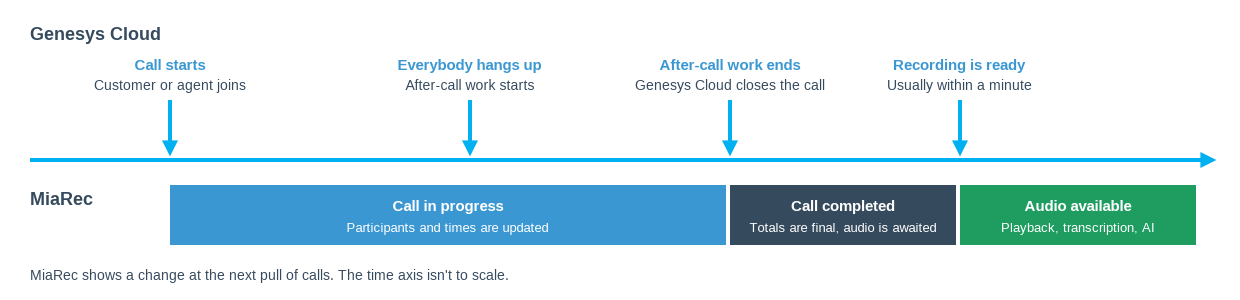
Three things determine the time:
- After-call work. Genesys Cloud closes a call when the last agent finishes the after-call work, and not when the customer hangs up. If your agents take 10 minutes to finish it, the audio arrives at least 10 minutes after the call.
- Genesys Cloud prepares the audio on request. The recording itself is usually ready within a minute. MiaRec then asks for a WAV file, and Genesys Cloud converts the recording.
- How often MiaRec pulls calls. Each of these steps waits for the next pull. The system operator sets the schedule. A shorter schedule shortens the wait, and sends more requests to Genesys Cloud.
Without the acw topic, the call can be completed up to one Update interval of calls in progress later.
What call details are shown in MiaRec?
Open a call and look at the Call Details tab:
| In MiaRec | In Genesys Cloud |
|---|---|
| User, Group | All agents of the call who have a user in MiaRec, and their groups |
| Connect Time, Disconnect Time | When the first participant joined, and when the last participant left |
| Duration | The time between the two. Includes the IVR and the queue wait, and doesn't include the after-call work. |
| Talk Time, Hold Time, In Queue Time, ACW Time | The contact center times of the call. See How to view, search by, and report on Talk, Hold, In Queue, and ACW time? |
| PBX Call Direction | The direction in which the conversation started |
| Agent Name, Agent ID | The agent who answered first: the name and the Genesys Cloud user ID |
| ACD Name, ACD Id | The first queue: the name and the queue ID |
| Caller party, Called party | The customer on one side. The IVR flow, queues, and agents on the other. |
| Participants | Everybody who took part, with the times when they joined, answered, and left. See Who is listed under Participants? |
| Files | The audio recordings |
| File State | Whether the audio is available |
The phone numbers are those that Genesys Cloud reports for the customer.
The following details are only on the Full call details page, which is available to system operators:
- Wrap-up codes, as part of the Telephony Events
- The data that Genesys Cloud returned (Signaling Packets)
The Genesys Cloud conversation ID isn't on the Call Details tab. See How to find a call by its Genesys Cloud conversation ID?
MiaRec doesn't import participant attributes, skills, languages, notes, bookmarks, and Genesys Cloud transcripts.
Who is listed under Participants?
Every party of the Genesys Cloud conversation, in the order in which they joined. The customer of an inbound call is first, because the customer joins when the call starts. Select the plus sign next to a participant to see its Type:
| Type | Who it is |
|---|---|
| External participant | The customer, or another external party |
| IVR | The Architect flow |
| Queue | A queue in which the call waited |
| Agent | An agent who was alerted, took part, or monitored the call |
| Voicemail | The mailbox, when the customer leaves a message. The message isn't imported. |
| Other | Any other party, such as a survey flow. The name includes the Genesys Cloud purpose, for example Post-Call Survey (voicesurveyflow). |
A participant answers when the ringing ends. An agent answers only by talking to the customer: an agent who monitors the call, or who takes a callback that the customer doesn't pick up, didn't answer.
How to view, search by, and report on Talk, Hold, In Queue, and ACW time?
| Time | What it measures |
|---|---|
| Talk Time | The time when at least one agent is on the phone in the call. When two agents talk at once, the time counts once. The time while the customer's phone rings for a callback doesn't count. |
| Hold Time | The time when an agent has the customer on hold. Overlapping holds count once. |
| In Queue Time | The time that the call waits in queues for an agent, including the wait of a callback. The time until a scheduled callback is due doesn't count. |
| ACW Time | After-call work. The sum over all agents of the call. |
The values are final when the call is completed. They can differ slightly from Genesys Cloud reports, which add up the times of the agents.
View. Everybody who can open a call sees its times on the Call Details tab, next to Duration. A time appears only when the call has one. To show the times in the list of calls, an administrator can add the columns Talk Time, Hold Time, In Queue Time, and ACW Time in Administration > Customization > Fields Visibility. They are hidden by default.
Search. Go to Recordings > Advanced Search, and add the filter Call - Talk Time, Call - Hold Time,
Call - In Queue Time, or Call - ACW Time. They have the same operators as Call - Duration, for example
Greater than 5:00. To find the calls that have no such time, use Not set (not available).
List each call. In a Call Details Report, add the columns Call - Talk Time, Call - Hold Time, Call - In Queue Time, and Call - ACW Time. You can sort by them, and use them in conditional formatting. See Conversation details report.
Report totals and averages. Use a Calls Summary Report, for example by users, groups, or intervals:
- Go to Reports, select Create, and select Calls Summary Report by Users.
- Under Columns, select Add Column, and choose from the following:
- Calls - Total Talk Time, Calls - Avg Talk Time
- Calls - Total Hold Time, Calls - Avg Hold Time
- Calls - Total In Queue Time, Calls - Avg In Queue Time
- Calls - Total ACW Time, Calls - Avg ACW Time
- To limit the report to Genesys Cloud calls, add the filter Call - Voip Protocol under Filtering Criteria.
- Select Save and Run.
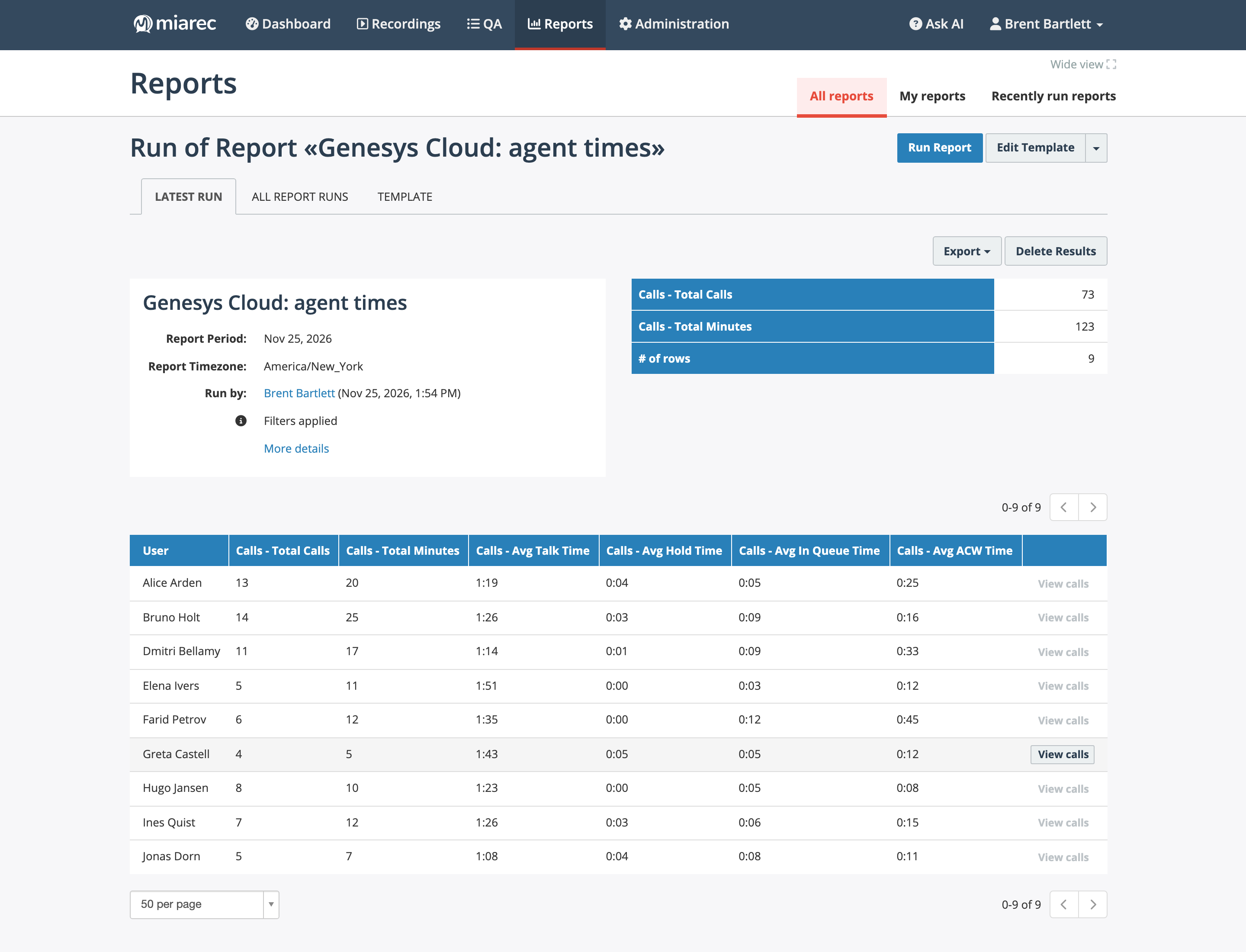
In a report by users, a call with several agents counts for each of them, with the times of the whole call. See Conversation summary reports.
A Calls Summary Report can also break a measure, such as the number of calls, down by one of the times, for example to see how many calls had a hold of more than a minute. Select a cell to see the calls that it counts.
Export. The job Send call metadata via webhook can include the times, for example for a data warehouse. Ask your system operator.
How to find a call by its Genesys Cloud conversation ID?
Go to Recordings > Advanced Search, and add the filter Call - PBX Call ID with the conversation ID. To show the ID in the list of calls, an administrator can add the column PBX Call ID in Administration > Customization > Fields Visibility. The column ACD Name (queue) is available there as well.
In Genesys Cloud, the conversation ID is in the address of the interaction's page.
What call scenarios are supported?
Inbound and outbound calls, calls on behalf of a queue, holds, blind and consult transfers, conferences, callbacks, abandoned calls, IVR-only calls, and calls that end in voicemail. See Call scenarios for how each of them appears in MiaRec, and for its limitations.
Can we load past calls?
Yes. The system operator loads them with a one-time job. See Load the calls of the last 30 days. A longer date range is possible, as long as Genesys Cloud still has the recordings and they aren't archived. Genesys Cloud returns the details of calls up to about 1.5 years old.
Are calls imported twice when two jobs find them?
No. MiaRec recognizes a conversation by its ID. You can run the one-time job while the regular job runs.
Is the wrap-up code shown?
Only on the Full call details page, as part of the telephony events. It's not a field of the call, so you can't search for it or use it in a report. A wrap-up code that an agent changes after the call was completed isn't updated.
Can a supervisor listen to a call in progress?
No. MiaRec shows calls in progress, but their audio is available only after the call. Use Genesys Cloud to monitor calls.
Recordings
Does MiaRec record the calls?
No. Genesys Cloud records them, and MiaRec imports the recordings. What Genesys Cloud doesn't record can't be played in MiaRec.
Why is the audio shorter than the call?
Genesys Cloud pauses the recording during the parts of a call that it doesn't record: the IVR, the queue wait, and the hold, depending on your settings, and secure pauses. It cuts each paused part out of the audio, and plays a 1.5-second tone where the part starts. A 30-second hold makes the audio 28.5 seconds shorter than the call. The IVR and the queue wait that follows it are one pause, with one tone. The after-call work isn't in the audio, because the recording ends when the customer hangs up.
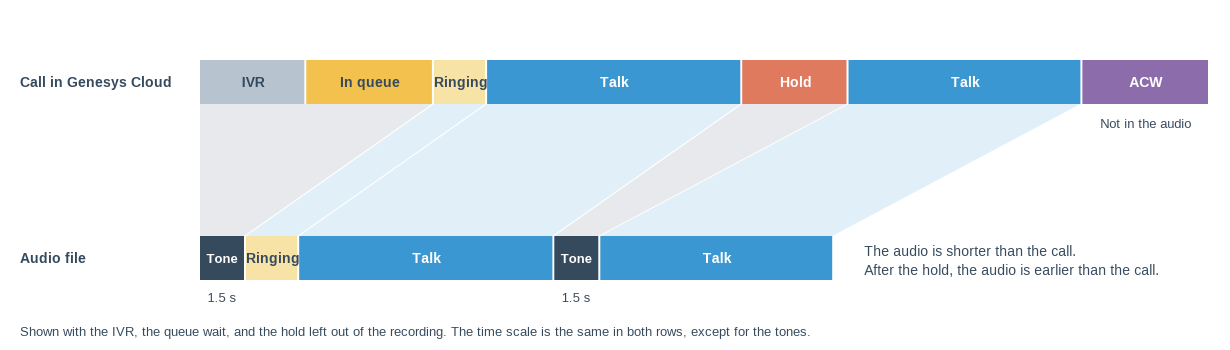
The audio is then out of step with the times of the call:
- A pause at the start, such as the IVR: MiaRec sets the start of the audio to the end of the pause. The audio lines up with the call times.
- A pause in the middle, such as a hold: everything in the audio after the pause is earlier than the call times suggest. For example, after a 30-second hold, what you hear 2 minutes into the audio was said about 2 minutes and 28 seconds after the audio started. The Participants timeline, the call times, and Hold Time follow the call. The player and the transcript follow the audio.
The system operator can see the pauses of a call, with their times, in Full call details. To keep the hold in the audio, record it. See Choose what is in the audio.
Can we record the hold and the consultation between agents?
Yes. Select Holds and Consults in the recording settings of the trunk in Genesys Cloud. Both are off by default. A consultation is then a second recording, and the MiaRec call has two audio files. See Choose what is in the audio.
Is the audio in stereo?
Only when Dual channel is selected in the recording settings of the trunk. It's off by default. Genesys Cloud then records the external participant, such as the customer, on channel 0, and the internal participant, such as the agent, on channel 1. MiaRec stores the WAV file as Genesys Cloud returns it.
To record in two channels:
- In Genesys Cloud, go to Menu > Digital and Telephony > Telephony > Trunks, and select the External Trunks tab.
- Open the trunk, and select Media.
- Under Recording, in Audio Format/Codec, select PCMU, PCMA, L16, or Opus. Dual channel is available only with these codecs.
- Select Dual channel.
- Save the trunk.
For recording on the phones, the phone settings have their own dual channel option.
Genesys Cloud documentation:
- External trunk settings: the Dual channel and Audio Format/Codec options
- Call recording overview in Genesys Cloud: dual channel support in trunk and phone recording
Are screen recordings imported?
No. Only audio recordings are.
Do deletions in Genesys Cloud and MiaRec affect each other?
A recording that Genesys Cloud deletes or archives stays in MiaRec, and a call that you delete in MiaRec stays in Genesys Cloud. Each system applies its own retention settings.
A call that you delete in MiaRec is imported again if a polling job covers its date. The job that reads Amazon SQS doesn't do this. See Load the calls of the last 30 days.
Users
Are users synchronized?
Yes. Two jobs create and link users:
- The pull users job, on its schedule, for all selected Genesys Cloud users.
- The pull calls job, when it imports a call of an agent who has no user in MiaRec.
| User attribute | Created from Genesys Cloud | Updated at each sync |
|---|---|---|
| Name | Yes | Yes |
| Yes | Yes | |
| Status (active or not) | Yes | Yes, when Sync user status is selected |
| Extension | The Genesys Cloud user ID | No |
| Role, group | From the settings of the job | No. Your changes in MiaRec are kept. |
| Login, web portal access | No access | No |
| Licenses | From the settings of the job. A user linked by email keeps its own. | No |
How does MiaRec recognize existing users?
By the Genesys Cloud user ID, which is an extension of the MiaRec user. When the job also matches by Email, a user with the same email address is linked: the job adds the Genesys Cloud user ID to the user's extensions. If neither matches, the job creates a user.
If your agents already have users in MiaRec, make sure that their email addresses are the same as in Genesys Cloud before the first run.
What happens when an agent leaves the company?
When the agent is deactivated or deleted in Genesys Cloud, the pull users job deactivates the user in MiaRec at its next run. The calls stay assigned to the user. When the agent is active again, the user is reactivated.
A call of a former agent, for example one that is loaded later, gets an inactive user.
Why aren't the calls of imported users transcribed?
A new user gets only the licenses selected in Licenses of new users of the job that created it. To change the licenses of existing users, go to Administration > User Management > Users, select the users, and select Bulk Edit. Set the licenses, for example Speech analytics and Agent evaluation.
To give the licenses to the users that the jobs create later, select them in Licenses of new users of both jobs. See Synchronization jobs.
Why do some calls have no user?
No agent took the call (for example, an abandoned call), or the agent has no user in MiaRec and the job isn't allowed to create one. To find the calls that no agent answered, go to Recordings > Advanced Search and use the filter Call - Agent Name, Is empty.
Can we import only some of our agents?
Yes. The pull users job can filter by division, group, team, queue, role, and department. The filters apply to the pull users job only. The pull calls job imports the calls of all agents that the OAuth client has access to. To limit the calls, limit the divisions of the OAuth client's role.
Setup and security
Can we use the integration without AWS?
Yes. Leave the Amazon SQS settings of the connection empty, and let the pull calls job use polling with a relative date range. It's slower to show changes, and sends more requests to Genesys Cloud.
Can we use the integration with AWS and polling at the same time?
Yes. Use Amazon SQS for the regular job. As a safety net, the system operator can add a second job that polls the last 2 days, for example once per hour. It imports calls whose events were lost.
What happens when MiaRec is unavailable?
The events wait in the queue, up to its message retention period. MiaRec reads them when it's available again. Calls whose events expired can be loaded by polling.
Does MiaRec change anything in Genesys Cloud?
No. MiaRec only reads from Genesys Cloud. In AWS, it deletes the messages that it has read from the queue.
How are the credentials protected?
MiaRec stores the client secret and the AWS secret access key encrypted, and doesn't show them after you enter them. All connections use HTTPS. The OAuth client has read permissions only, and the AWS access key can only read the queue and delete messages that were read.
Can we connect more than one Genesys Cloud organization?
Yes. Add a connection for each organization, with a queue of its own. A second connection to the same organization is refused.
Does the integration use up our Genesys Cloud API limits?
Genesys Cloud limits requests for each OAuth client. With its own OAuth client, MiaRec doesn't affect your other applications. When Genesys Cloud refuses a request because of a limit, MiaRec waits and continues by itself.