MiaRec configuration
This article explains how to set up a MiaRec tenant for a NetSapiens customer, so that the customer's recordings are assigned to the right tenant and users.
How a NetSapiens domain maps to a MiaRec tenant
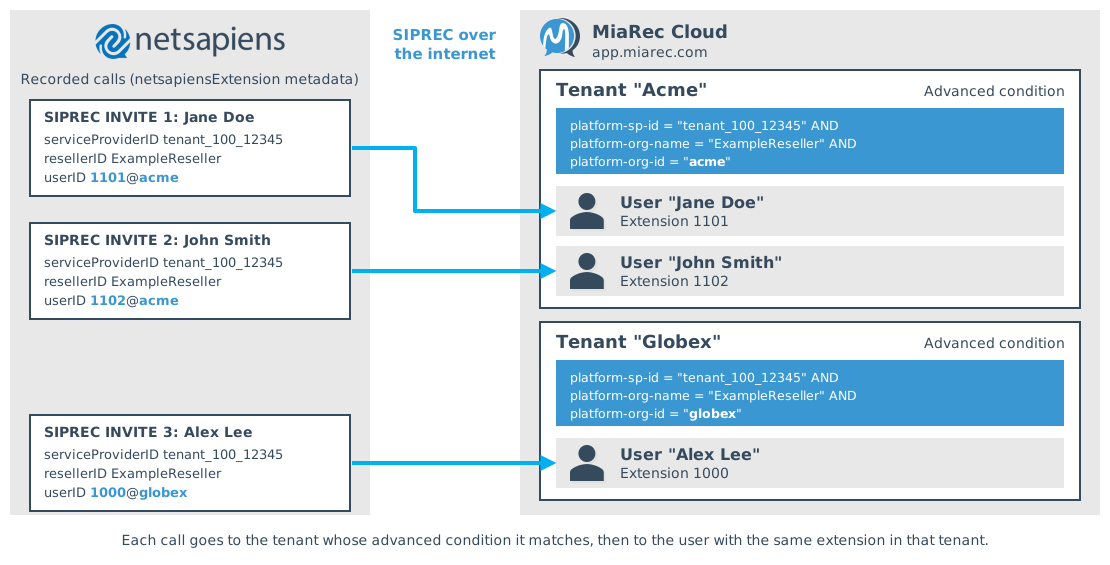
Each NetSapiens domain (customer) maps to one MiaRec tenant. NetSapiens sends the service provider ID, the
reseller ID, and the domain with each recording, and the tenant matches calls on all three. Users are matched by the
extension (the user part of the NetSapiens user ID, for example 1101 in 1101@acme).
Find the customer's values
NetSapiens sends the three values in the netsapiensExtension element of the SIPREC metadata:
<netsapiensExtension xmlns="http://schema.netsapiens.com/netsapiensSipRec" version="1.1">
<serviceProviderID>tenant_100_12345</serviceProviderID>   <!-- platform-sp-id -->
<user userID="1101@acme">                                 <!-- platform-org-id: acme -->
<resellerID>ExampleReseller</resellerID>                  <!-- platform-org-name -->
<callType>origCall</callType>
</user>
...
</netsapiensExtension>
To read them, make a test call for the customer (see NetSapiens configuration, Step 3) and open the SIPREC INVITE in the call trace, or ask the NetSapiens administrator.
Example SIPREC INVITE from NetSapiens
A call from Jane Doe (1101) to John Smith (1102) in the acme domain. The values are examples.
INVITE sip:srs@siprec.miarec SIP/2.0
Via: SIP/2.0/TCP 203.0.113.10;branch=z9hG4bK7dLQ3Slujkf88n2e0E6156
From: <sip:+12025550123@core1.example.net>;tag=7dLQ3Slujkf88n2e0E6156
To: <sip:srs@siprec.miarec>
Call-ID: 20261016150210006373-0a1b2c3d4e5f60718293a4b5c6d7e8f9
CSeq: 200 INVITE
Contact: <sip:+12025550123@203.0.113.10:5060;transport=tcp>;+sip.src
Max-Forwards: 20
Server: NetSapiens SiPBx
Require: siprec
Accept: application/sdp
Content-Type: multipart/mixed;boundary=Boundary_1029384756_0192837465
Content-Length: 2967

--Boundary_1029384756_0192837465
Content-Type: application/sdp
Content-Length: 359

v=0
o=NetSapiens_Nms 1790970906 1790970906137 IN IP4 203.0.113.10
s=SIP Media Description
c=IN IP4 203.0.113.10
t=0 0
m=audio 15930 RTP/AVP 0 8 101
a=rtpmap:0 PCMU/8000
a=rtpmap:8 PCMA/8000
a=rtpmap:101 telephone-event/8000
a=fmtp:101 0-15
a=label:1
m=audio 15928 RTP/AVP 0 101
a=rtpmap:0 PCMU/8000
a=rtpmap:101 telephone-event/8000
a=fmtp:101 0-16
a=label:2

--Boundary_1029384756_0192837465
Content-Disposition: recording-session
Content-Type: application/rs-metadata+xml
Content-Length: 2350

<?xml version="1.0" encoding="UTF-8"?>
<recording xmlns="urn:ietf:params:xml:ns:recording:1">
<datamode>complete</datamode>
<group group_id="61824d59bc3dffb2">
<associate-time>2026-10-16T15:02:10Z</associate-time>
</group>
<session session_id="20261016150210006374">
<group-ref>61824d59bc3dffb2</group-ref>
<sipSessionID>61824d59bc3dffb2;remote=20261016150210006370-0a1b2c3d4e5f60718293a4b5c6d7e8f9</sipSessionID>
</session>
<participant participant_id="61824d59bc3dffb2">
<nameID aor="sip:1101@acme">
<name>Jane Doe</name>
</nameID>
</participant>
<participant participant_id="20261016150210006370-0a1b2c3d4e5f60718293a4b5c6d7e8f9">
<nameID aor="sip:1102@acme">
<name>John Smith</name>
</nameID>
</participant>
<stream stream_id="tql0sXWYEE6Sa3Xz0E614E" session_id="20261016150210006374">
<label>1</label>
</stream>
<stream stream_id="wSz7YJoDZXbj5uNJ0E6150" session_id="20261016150210006374">
<label>2</label>
</stream>
<participantsessionassoc participant_id="61824d59bc3dffb2" session_id="20261016150210006374">
</participantsessionassoc>
<participantsessionassoc participant_id="20261016150210006370-0a1b2c3d4e5f60718293a4b5c6d7e8f9" session_id="20261016150210006374">
</participantsessionassoc>
<participantstreamassoc participant_id="61824d59bc3dffb2">
<send>tql0sXWYEE6Sa3Xz0E614E</send>
<recv>wSz7YJoDZXbj5uNJ0E6150</recv>
</participantstreamassoc>
<participantstreamassoc participant_id="20261016150210006370-0a1b2c3d4e5f60718293a4b5c6d7e8f9">
<send>wSz7YJoDZXbj5uNJ0E6150</send>
<recv>tql0sXWYEE6Sa3Xz0E614E</recv>
</participantstreamassoc>
<netsapiensExtension xmlns="http://schema.netsapiens.com/netsapiensSipRec" version="1.1">
<groupSeq>0</groupSeq>
<serviceProviderID>tenant_100_12345</serviceProviderID>
<user userID="1101@acme">
<resellerID>ExampleReseller</resellerID>
<callType>origCall</callType>
</user>
<user userID="1102@acme">
<resellerID>ExampleReseller</resellerID>
<callType>termCall</callType>
</user>
<callingParty participant_id="61824d59bc3dffb2">
<nameID aor="sip:1101@acme">
<uid>1101@acme</uid>
<name>Jane Doe</name>
</nameID>
<number>+12025550123</number>
</callingParty>
<calledParty participant_id="20261016150210006370-0a1b2c3d4e5f60718293a4b5c6d7e8f9">
<nameID aor="sip:1102@acme">
<uid>1102@acme</uid>
<name>John Smith</name>
</nameID>
<number>1102</number>
</calledParty>
</netsapiensExtension>
</recording>

--Boundary_1029384756_0192837465--
Configure MiaRec
Step 1. Create the tenant
- In the MiaRec web portal, navigate to Administration > User Management > Tenants and click Add.
- Enter the tenant Name (for example, the customer's name), and optionally the timezone and language.
- Under License limits, enter the seats the customer purchased.
-
Under Recording settings, set Recording Interface to SIPREC.
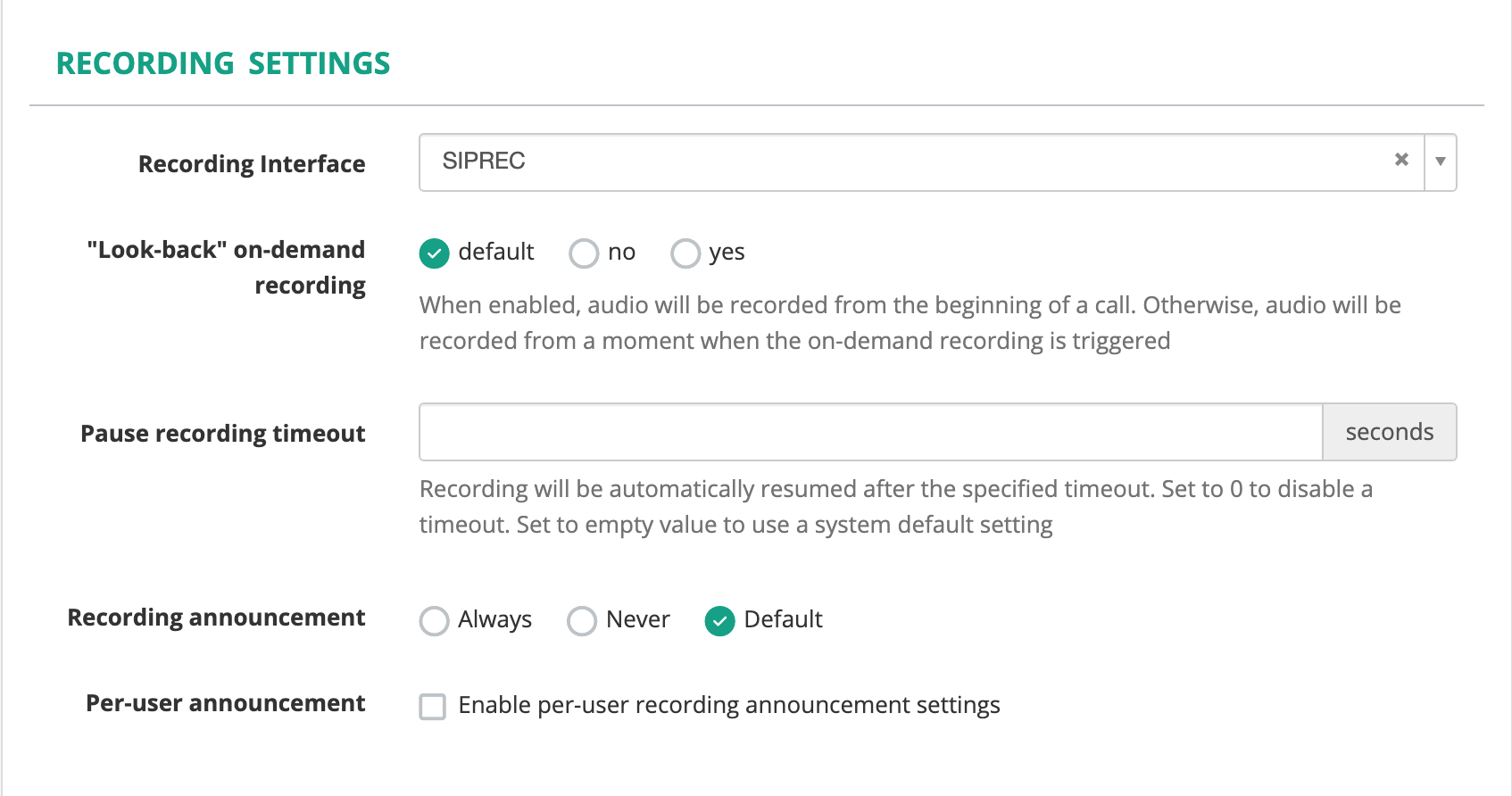
Don't save yet; continue with the next step on the same form.
See Onboarding a tenant for the full procedure.
Step 2. Associate NetSapiens calls with the tenant
NetSapiens identifies the customer in the SIPREC metadata of every recorded call. MiaRec matches the tenant on these three values:
- Service provider ID (
serviceProviderID), matched byplatform-sp-id - Reseller (
resellerID), matched byplatform-org-name - Domain (the host part of the user ID, for example
acmein1101@acme), matched byplatform-org-id
Matching all three keeps the tenant unique even when two service providers or resellers use the same domain name. See Find the customer's values above.
Under Associate calls with tenant, set:
- Extension is …: set to Phone number
- Extension uniqueness: set to Within tenant only. NetSapiens extensions such as
1101usually exist in more than one domain. - Associate calls with tenant if they match to: set to Advanced condition
-
Advanced condition: match the customer's three values, for example:
platform-sp-id = "tenant_100_12345" AND platform-org-name = "ExampleReseller" AND platform-org-id = "acme" -
Record unknown users: set to Record (required for user auto provisioning)
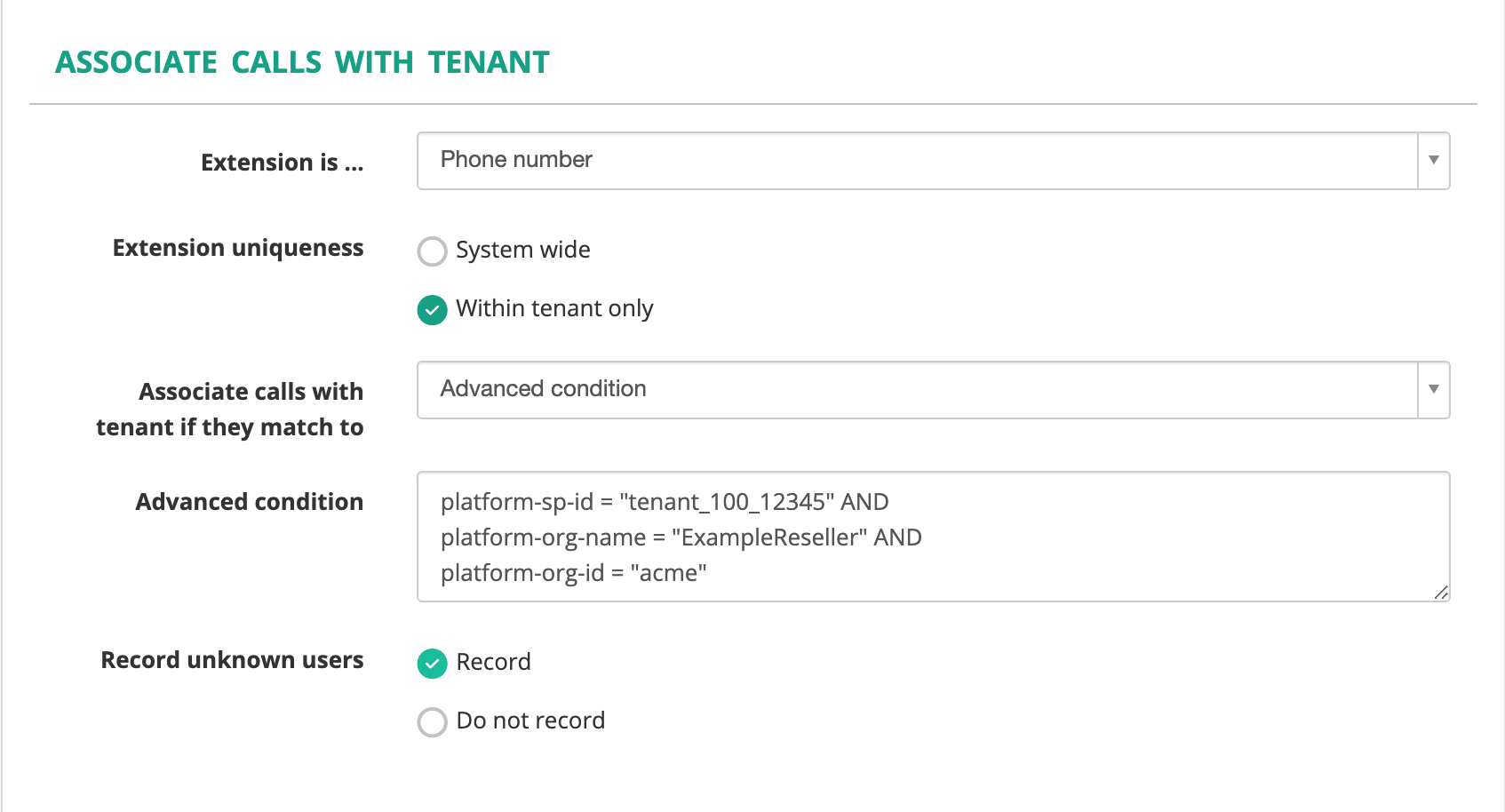
Click Save.
See Tenant configuration for a description of each setting.
Step 3. Create users
Create a MiaRec user for each NetSapiens user whose calls are recorded, and set the user's extension to the
NetSapiens extension (for example, 1101).
- Open the tenant, select the Users tab, and click Add User.
- Enter the user's Name and select a Role.
-
Under Recording settings, enter the NetSapiens extension in Extension. Click Add Extension to add more than one.
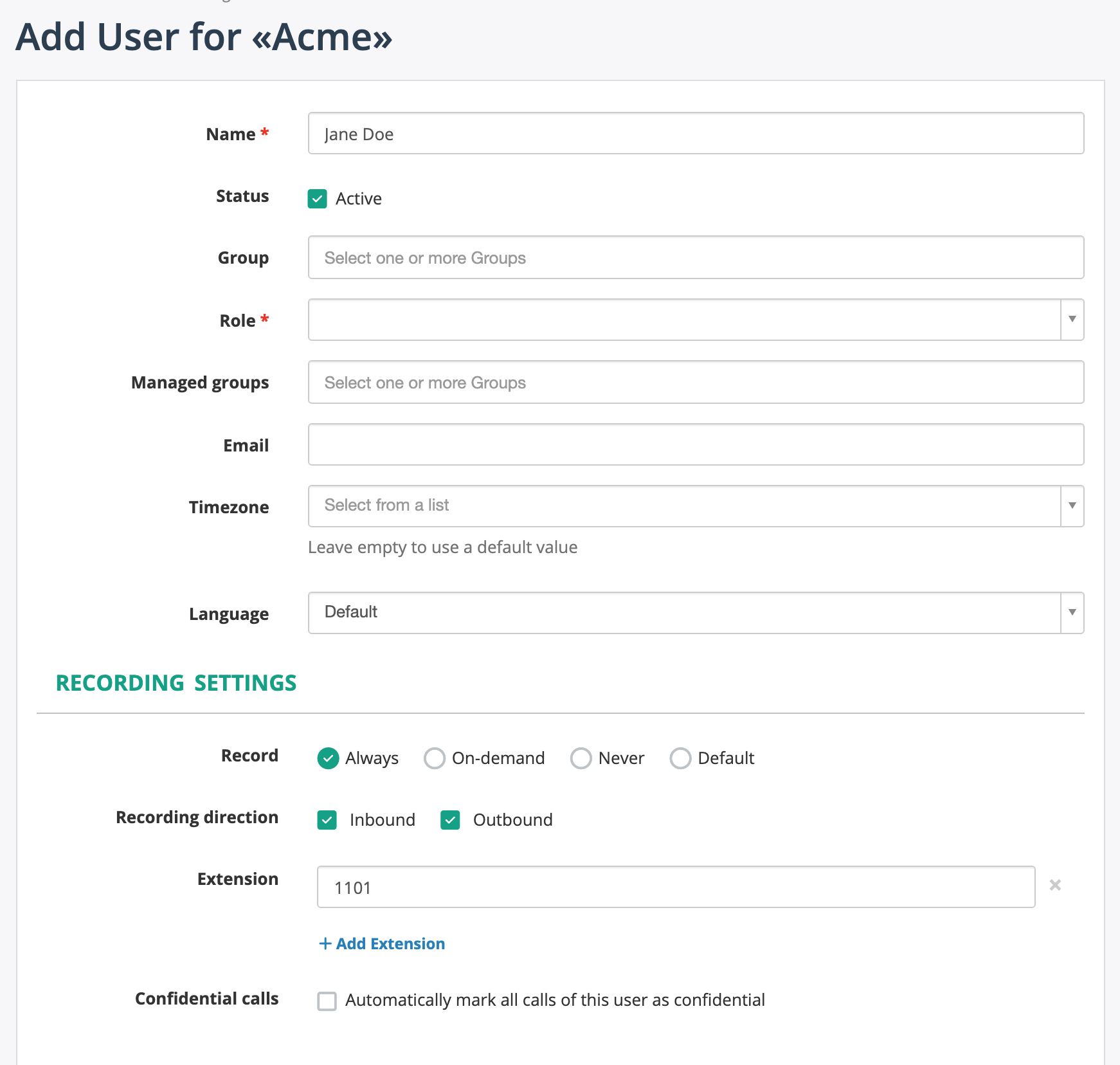
-
To let the user sign in to the portal, fill in Login under Web portal access settings, check Web portal access, and set a password or Single Sign-On.
- Click Save.
Alternatively, enable User auto provisioning in the tenant settings. MiaRec then creates a user the first time a call arrives for an unknown extension in the tenant. See Tenant configuration.
Step 4. Assign roles
MiaRec controls access to recordings with roles and permissions. Assign each user a role, such as administrator, supervisor, or agent.
Step 5. Verify a test call
After you add the customer's LIC entries in NetSapiens, make a test call (see NetSapiens configuration, Step 3) and check that:
- the recording appears under Recordings in the customer's tenant;
- the call is assigned to the right user;
- the audio plays back on both sides of the conversation.