The conversation detail page
Every conversation has a detail page — the single place where its audio, AI results, evaluations, and collaboration data come together. Open it from the Conversations list by expanding a row and clicking More details or Open in new window.
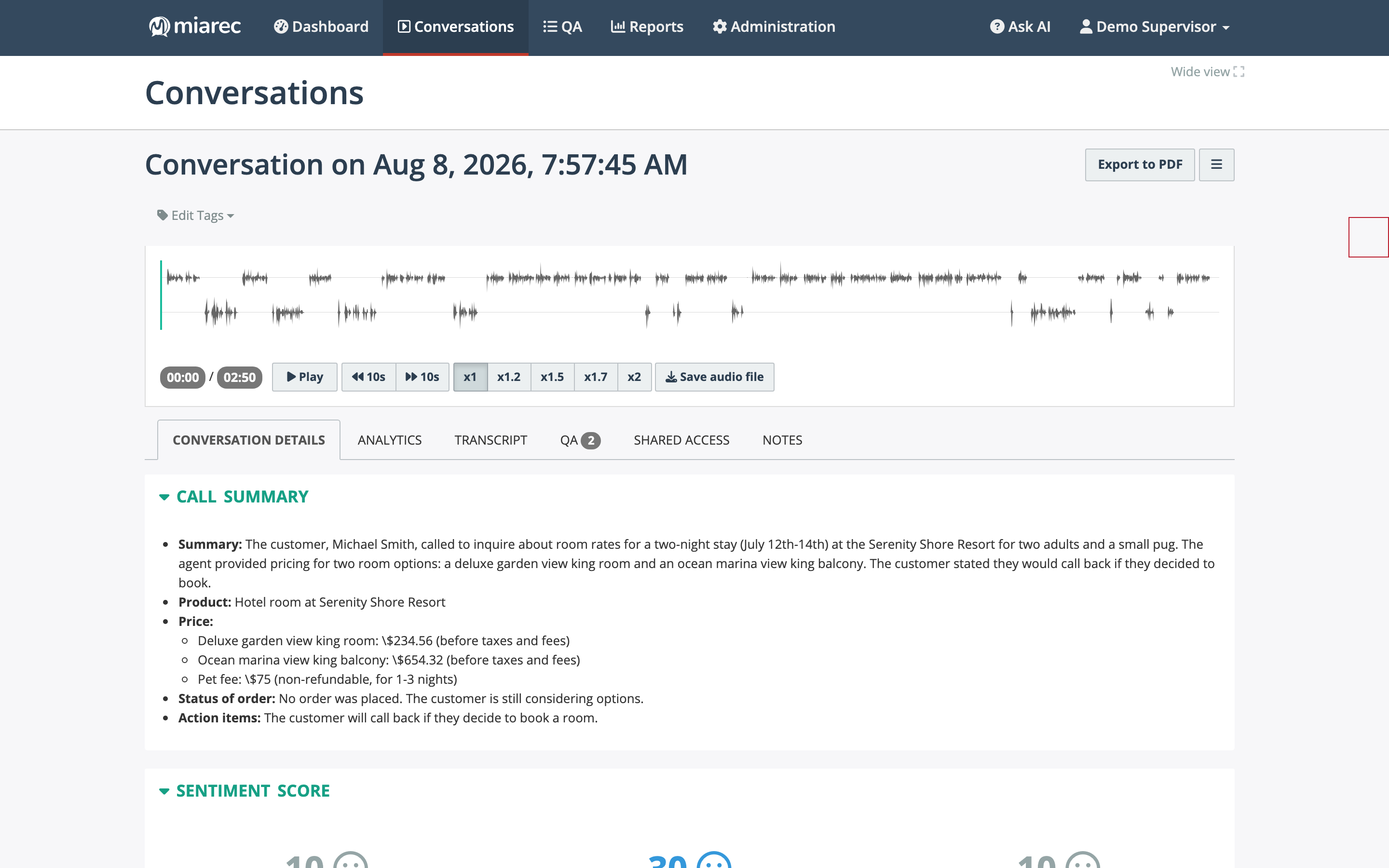
The detail page: the page title shows the conversation's date and time; below it are the audio player with waveform and the tab bar. The Conversation Details tab opens with the AI summary.
Page layout
From top to bottom:
- Title — "Conversation on date, time", with Export to PDF and an action menu on the right. Depending on your permissions, the action menu includes marking the conversation confidential, setting the Do-Not-Delete flag, and deleting it.
- Edit Tags — assign or remove tags.
- Audio player — waveform playback with speed control; see Playing a conversation.
- Tabs — the rest of the page is organized into tabs.
Tabs
| Tab | What it contains |
|---|---|
| Conversation Details | Summary, sentiment, metadata, and parties — see below. |
| Analytics | AI insight values grouped by category — CX metrics, call reason and outcome, sales metrics, and any custom insights. See AI insights. |
| Transcript | The speaker-separated transcript — see Transcripts. |
| QA | Evaluations of this conversation; the badge shows how many exist. See Quality Assurance. |
| Shared access | Who this conversation is shared with — see Sharing conversations. |
| Notes | Threaded notes; the badge shows how many exist. See Notes & collaboration. |
Tabs appear only when relevant to you: for example, the Analytics and Transcript tabs require an available transcript together with transcript-view and playback permissions.
The Conversation Details tab
The first tab collects the conversation's core information:
- Call Summary — the AI-written summary of the conversation: what it was about, key facts, the outcome, and action items. See Conversation summaries.
- Sentiment Score — overall, agent, and customer sentiment scores with a written explanation. See Sentiment.
- Info — metadata: group, user, date and time, duration, direction, disconnect cause, and other attributes captured with the conversation, including custom fields.
- Caller party / Called party — the participants' numbers and names. For an external party you can associate the conversation with a client.
- All calls in this interaction — appears when the conversation is part of a group of related segments; see Grouped conversation segments.
- Audit Trail — a collapsible log of who accessed or changed this conversation.
Where to go next
- Playing a conversation — the audio player in detail.
- Transcripts — reading and downloading the transcript.
- AI insights — what the Analytics tab shows and how to edit empty values.