Creating custom insights
A custom insight is an AI task you define yourself: a prompt that extracts a specific data point from every conversation — a satisfaction score, a churn signal, a product name — and writes it into a custom field. This page covers the workflow, prompt-writing guidance, and worked recipes for the most common insights.
Before you begin
- Create the destination custom field(s) under Administration › Customization › Custom Fields
(see Custom fields):
- Use the Number type for scores — numeric fields can be enabled as dashboard metrics and given color thresholds.
- Use Dropdown for classifications with a fixed set of values, and Text for free-form extractions.
- Decide which conversations the insight should process (all of them, or a filtered subset).
Create the AI task
- Go to Administration › Conversation Analytics › AI Tasks and click Add.
- Choose the custom-field task type — a single Custom field, or Multiple custom fields to fill several fields from one JSON response.
- Name the task and select the destination field(s).
- Write the prompt (see the guidance below), pick the Response Type, and set the filtering criteria if needed.
- Click Save and Test to try the task on a real conversation in the AI Playground, then enable it.
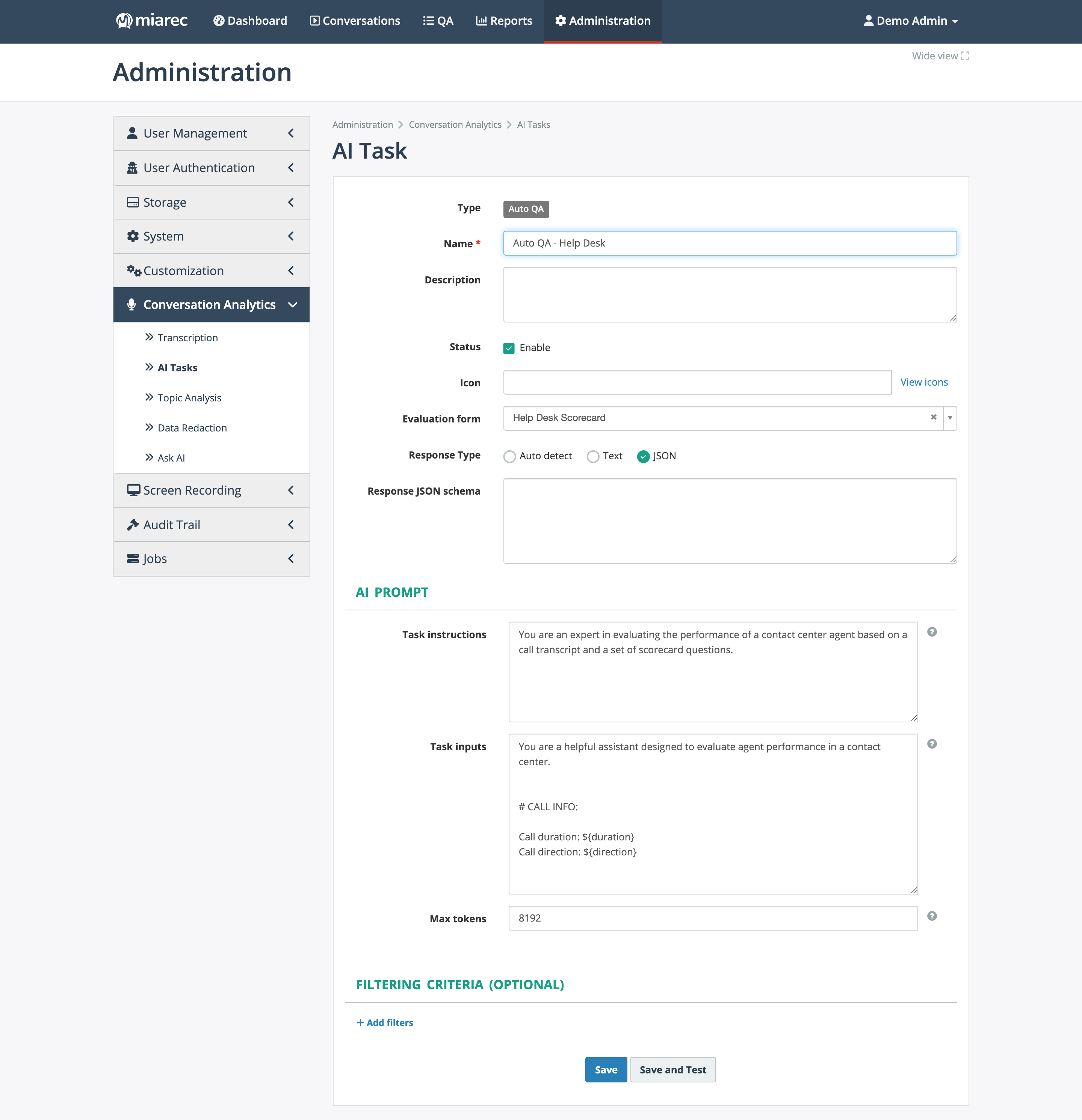
The AI task editor. Notice the Response Type radios with the Response JSON schema box, the two prompt areas (Task instructions and Task inputs), and the Save and Test button.
Writing reliable prompts
- Ask for JSON. Set Response Type to JSON and describe the exact output shape; add a response JSON schema so malformed answers are rejected.
- Extract a value plus an explanation. Custom-field values written by AI carry the model's explanation and confidence — reviewers trust a score far more when they can read why it was assigned.
- Be deterministic. Specify the allowed values or range ("an integer from 1 to 5"), what to answer
when the conversation contains no evidence (for example
null), and "return JSON only, with no extra commentary". - Keep instructions and inputs separate. Task instructions define the role and rules; Task
inputs carry the data and must include
${transcript}. - Never include real customer data in prompt examples.
Recipe: CSAT (customer satisfaction)
What it provides: an estimated 1–5 customer-satisfaction score per conversation, with the AI's reasoning.
- Create a Number custom field named
CSAT; enable it for dashboards and set thresholds (for example red below 3) so scores are color-coded. - Add an AI task with destination Custom field →
CSAT, response type JSON. -
Task instructions along these lines:
You are an expert in customer-experience analysis. Read the call transcript and rate the customer's satisfaction with the conversation on a scale of 1 (very dissatisfied) to 5 (very satisfied). Base the rating only on evidence in the transcript. Respond with JSON only, in the form: {"value": <integer 1-5 or null if there is no evidence>, "explanation": "<one or two sentences citing the evidence>"} -
Test in the Playground on a few conversations with obviously happy and obviously unhappy customers, then enable the task.
Where it appears: the conversation's Analytics tab, search filters, report columns, and — because the field is dashboard-enabled — a dedicated dashboard tab (see CX metric dashboards).
Recipe: NPS and NES
The same pattern produces other CX metrics — only the question changes:
- NPS (Net Promoter Score): ask for the likelihood (0–10) that the customer would recommend your company, judged from the conversation.
- NES: ask how easy it was for the customer to get their issue resolved, on your chosen scale.
Create one Number field per metric, keep the value + explanation JSON shape, and enable the fields for dashboards.
Recipe: churn risk
What it provides: a Conversation Analytics insight flagging conversations where the customer shows signs of leaving — cancellation talk, comparisons with competitors, repeated unresolved complaints.
- Create a Dropdown custom field
Churn riskwith options such asLow,Medium,High. -
Add an AI task with destination Custom field →
Churn risk, response type JSON:Assess the risk that this customer will cancel or stop doing business with us, based only on this conversation. Consider explicit cancellation requests, mentions of competitors, and unresolved dissatisfaction. Respond with JSON only: {"value": "<Low|Medium|High>", "explanation": "<one or two sentences citing the evidence>"} -
Test, enable, and use search to review
Churn risk = Highconversations regularly (see Advanced search).
Troubleshooting
- Values stay empty — check that the task is enabled, that its filtering criteria match the conversations you expect, that the users involved hold the Conversation Analytics license, and that your organization has not hit its AI usage limit.
- Inconsistent values — tighten the allowed values in the prompt and add a response JSON schema; test edge cases in the AI Playground.
- Wrong field filled — the destination mapping is part of the task; open the task's settings and verify the selected custom field.
Related pages
- AI tasks — the underlying mechanism and the task editor.
- Custom fields — field types, thresholds, dashboard enablement.
- AI Playground — validating prompts before enabling.