Advanced search
Advanced search is a filter builder: combine any number of criteria — metadata, transcript text, sentiment, AI insight fields, evaluation results — to find exactly the conversations you need.
Build a search
- On the Conversations page, open the Advanced Search tab.
- In the first drop-down, select a parameter (for example Call - Duration).
- Select a condition (for example Greater than).
- Enter or select a value, if the condition needs one.
- Click + Add filters to add more criteria. All criteria must match (AND logic).
- Click Search.
Click Save Search to keep the criteria for later — see Saved searches.
Search transcript text
Transcript search is part of advanced search:
- Select the Call - Transcript parameter.
- Select the Search query condition.
- Enter the word or phrase and click Search.
Each matching conversation shows keyword-in-context snippets under the row, so you can judge relevance before opening it.
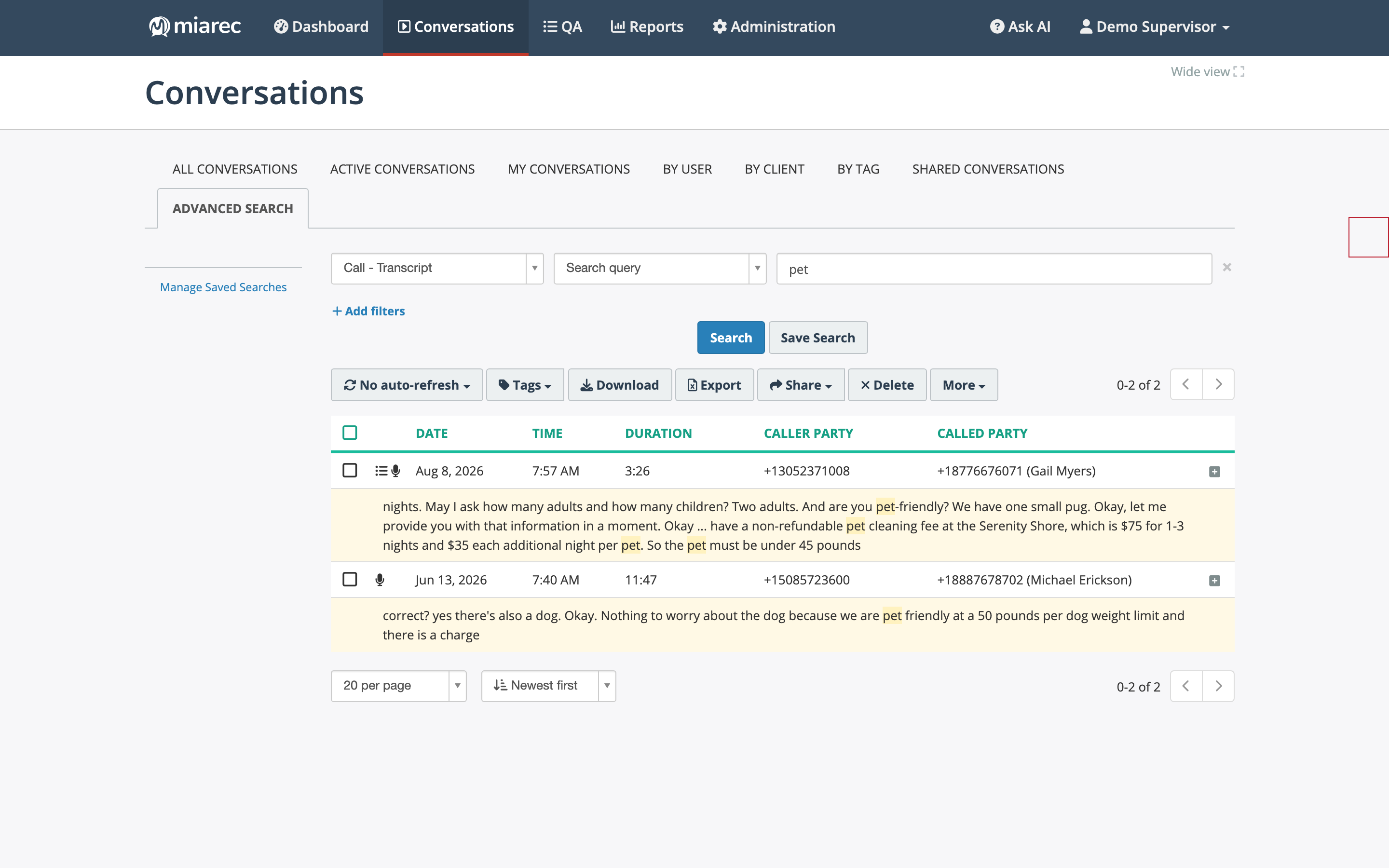
A transcript search for "pet": each hit shows highlighted snippets from the transcript directly in the result list.
You can also use Call - Transcript with the Not empty / Is empty conditions to find conversations with or without a transcript.
Parameter groups
The parameter list is long. The most commonly used families:
- Conversation metadata — date/time, duration, direction, caller/called party number and name, user, group, tags, client, confidential and do-not-delete flags.
- AI analytics — Call - Summary (full-text), Call - Transcript (full-text), sentiment
scores and labels (overall, agent, customer — see Sentiment),
Call - Topic / Call - Topic Match, and one
Call - <field name>parameter for every custom field, including AI-filled insight fields such as CSAT or Call Reason. - Evaluations — Call - Evaluation Report - Form / Score / Status / Pass Status and Call - Evaluation Reports Count, for finding conversations by their QA results.
- Notes — note text, author, dates, pinned and resolved status.
- Grouped segments — Call - Interaction ID, Call - Interaction Segment Number, and Call - Interaction Total Segments, for conversations grouped by transfer.
- Redaction — whether a conversation was redacted and by which rule.
Conditions
Conditions depend on the parameter type. Text parameters offer Contains, Starts with, Equal to, and pattern matching; numeric parameters offer comparisons such as Greater than and Between; list parameters offer Is, One of, and their negations; most parameters support Is set (available) / Not set (not available) or Is empty / Not empty checks.
Related pages
- Quick search — the fast metadata search on the list toolbar.
- Saved searches — save, share, and re-run searches.
- Export to CSV — export the metadata of found conversations.