My profile
The My Profile area holds your personal settings: contact details, timezone, language, password, and account security. To open it, click your name in the top-right corner of the portal and select My Profile.
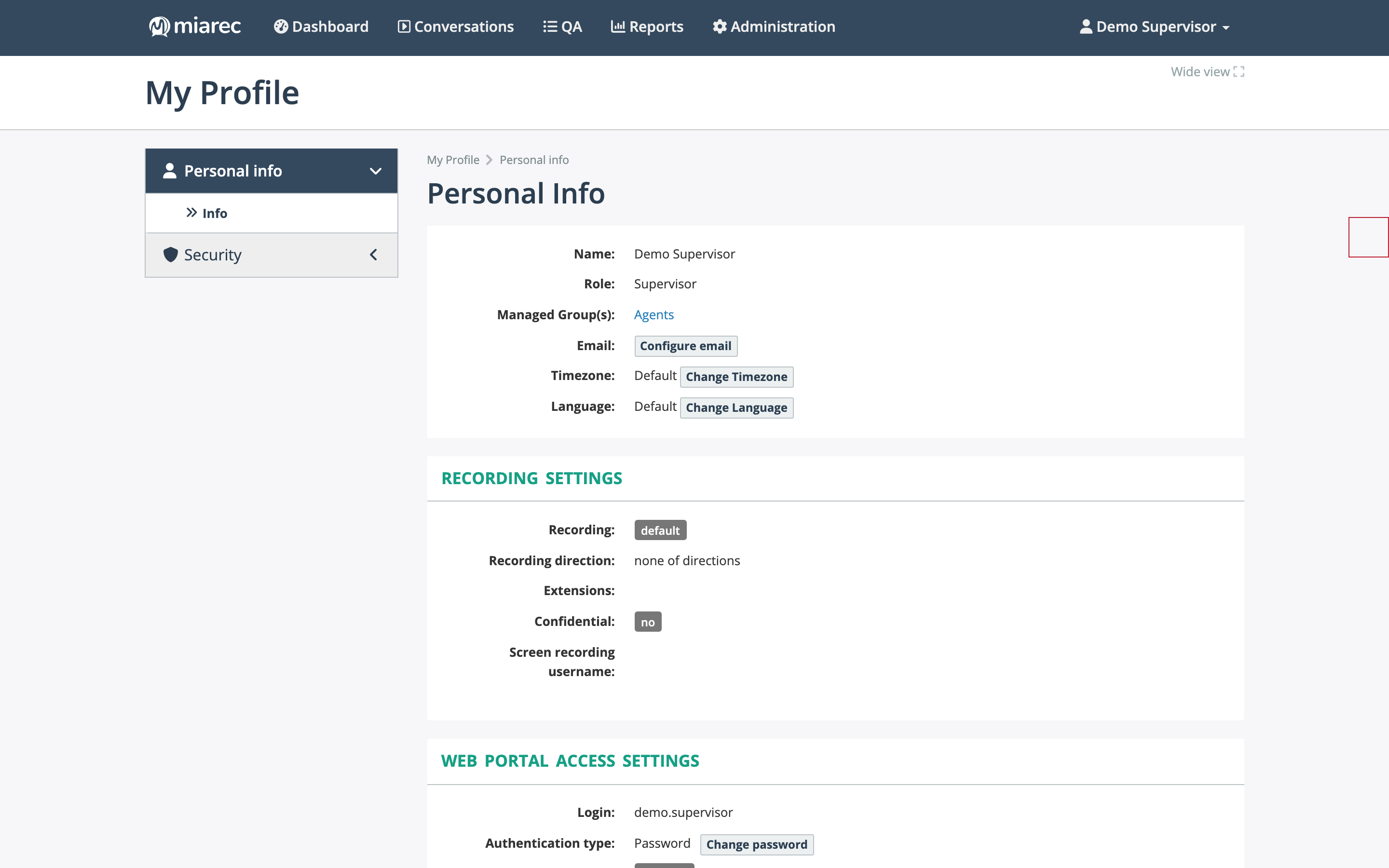
The Personal Info page. Notice the buttons next to the email, timezone, and language rows — the settings you can change yourself — and the read-only Recording Settings panel and the Web Portal Access Settings panel below.
Personal Info
The Personal Info page shows your account details:
- Name, Role, and Group(s) (shown as Managed Group(s) for supervisors) — who you are in the system. These are managed by your administrator; contact them if something is wrong.
- Email — used for notifications and password reset. Click Configure email to set or change it.
- Timezone — the timezone used to display dates and times. Click Change Timezone to override the default.
- Language — the portal language. Click Change Language — see Changing the language.
Recording Settings
The Recording Settings panel summarizes how your conversations are captured: the recording mode, direction, your extensions, and whether your conversations are marked confidential. These settings are read-only here — they are configured by your administrator (see Recording settings in the Administration Guide).
Web Portal Access Settings
The Web Portal Access Settings panel shows your sign-in details: your login, authentication type, and recent sign-in activity. From here you can change your password — see Changing your password.
Security
The Security section of My Profile covers two-step verification, single sign-on links, your devices, and active web sessions — see Account security.