Overview
This guide explains how to connect MiaRec to Genesys Cloud, so that MiaRec imports the calls and recordings from Genesys Cloud.
How it works
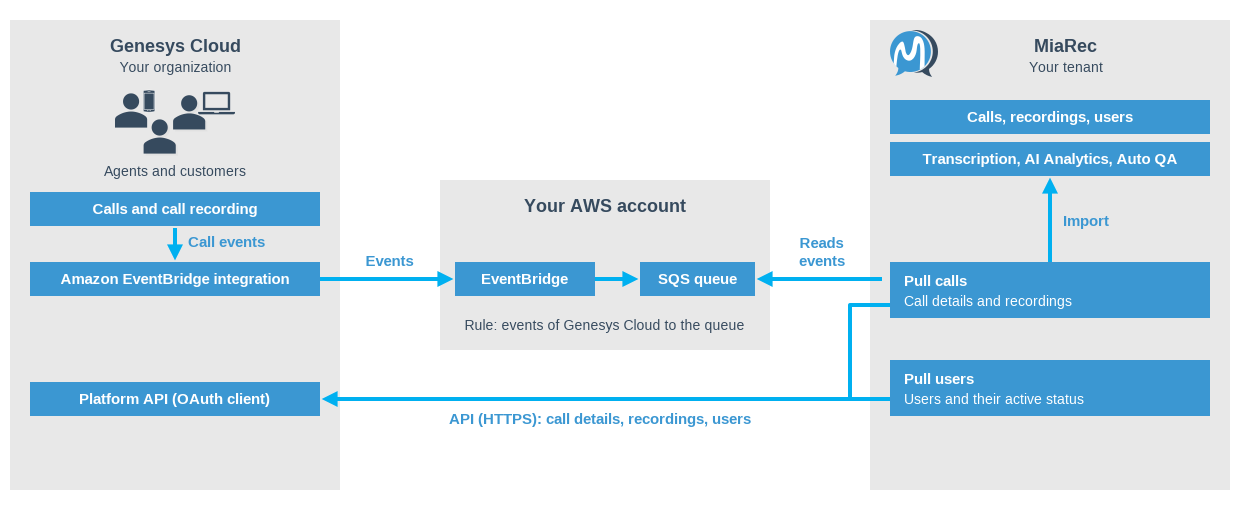
- Genesys Cloud records the calls, and sends call events through Amazon EventBridge to an Amazon SQS queue in your AWS account.
- MiaRec periodically reads the events from the queue, and pulls the call details, the recordings, and the user information from Genesys Cloud through the API.
What you need
| From | What you need |
|---|---|
| Genesys Cloud | An administrator who can create roles, OAuth clients, and integrations. Call recording must be turned on. |
| AWS | An AWS account, and an administrator who can create SQS queues, EventBridge rules, and IAM users. |
| MiaRec | A tenant administrator account. The system operator must have set up the Genesys Cloud integration. |
Who does what
- The Genesys Cloud administrator and the AWS administrator work in your own environments.
- The tenant administrator connects MiaRec to your Genesys Cloud organization.
- The system operator runs the MiaRec platform: MiaRec for the cloud service, your service provider, or your own IT team for an on-premises deployment. The system operator sets up the integration and the jobs.
Setup steps
| Step | Who | What |
|---|---|---|
| 1 | Genesys Cloud administrator | Create the role and the OAuth client |
| 2 | AWS and Genesys Cloud administrators | Create the SQS queue and send the events to it |
| 3 | Tenant administrator | Connect MiaRec to Genesys Cloud |
| 4 | System operator | Create the synchronization jobs |
| 5 | Tenant administrator | Verify the setup |
Network access
MiaRec opens outbound HTTPS connections (TCP port 443) to the following hosts. For an on-premises deployment, allow
them in the firewall. <domain> is the domain of your Genesys Cloud region, for example mypurecloud.de.
| Host | Used for |
|---|---|
login.<domain> |
Sign-in of the OAuth client |
api.<domain> |
Call details, recordings, users, queues, wrap-up codes |
api-downloads.<domain> |
Download of the audio files |
sqs.<aws-region>.amazonaws.com |
Reading the Amazon SQS queue |
The download host differs from the API host. If it's blocked, calls appear without audio.
Genesys Cloud regions and domains
| Region | Domain |
|---|---|
| US East (Virginia) | mypurecloud.com |
| US East 2 (Ohio) | use2.us-gov-pure.cloud |
| US West (Oregon) | usw2.pure.cloud |
| Canada (Central) | cac1.pure.cloud |
| Europe (Ireland) | mypurecloud.ie |
| Europe (London) | euw2.pure.cloud |
| Europe (Frankfurt) | mypurecloud.de |
| Europe (Zurich) | euc2.pure.cloud |
| Asia Pacific (Mumbai) | aps1.pure.cloud |
| Asia Pacific (Tokyo) | mypurecloud.jp |
| Asia Pacific (Seoul) | apne2.pure.cloud |
| Asia Pacific (Osaka) | apne3.pure.cloud |
| Asia Pacific (Sydney) | mypurecloud.com.au |
| South America (Sao Paulo) | sae1.pure.cloud |
| Middle East (UAE) | mec1.pure.cloud |
If your region isn't listed, ask your system operator.
Next steps
Start with Genesys Cloud configuration.