Pipeline overview
Conversation Analytics is not one service but a chain of jobs. Each conversation flows through the pipeline stage by stage:
- Capture — a conversation is recorded, imported, or uploaded. When it completes, the platform raises a pipeline event (for example Call - Recording finished).
- Transcription — the Transcribe recordings job sends the audio to a speech-to-text engine and stores the transcript. See Transcription.
- AI tasks — the AI Assistant job runs the enabled AI tasks against the transcript through a generative AI engine and writes the results to their destinations: summary, sentiment scores, topics, custom fields, notes, speaker labels, and — if the tenant uses it — Auto QA evaluations.
- Optional stages — entity recognition tags named entities in the transcript, and data redaction masks sensitive content in audio and transcript.
Everything the customer-facing guides describe as "processed automatically" is produced by this chain. The operator's job is to keep it flowing: engines reachable, queues draining, jobs running, limits not exhausted.
Queues connect the stages
Stages are glued together by processing queues (Administration › Jobs › Processing Queues). A queue is populated by events — Call - Recording finished, Call - Transcription completed, Call - Redaction completed, Call - Upload completed, replication events, and so on — and one or more jobs consume it as their data source. A typical chain:
recording finished ──▶ [queue] ──▶ Transcribe recordings ──▶ [queue] ──▶ AI Assistant
The transcription job's Action after successful processing publishes each finished conversation to the next queue, where the AI Assistant job picks it up. The same pattern extends the chain to entity recognition or redaction. Queues, events, and the source/destination/error roles are explained in detail in Pipeline and queues.
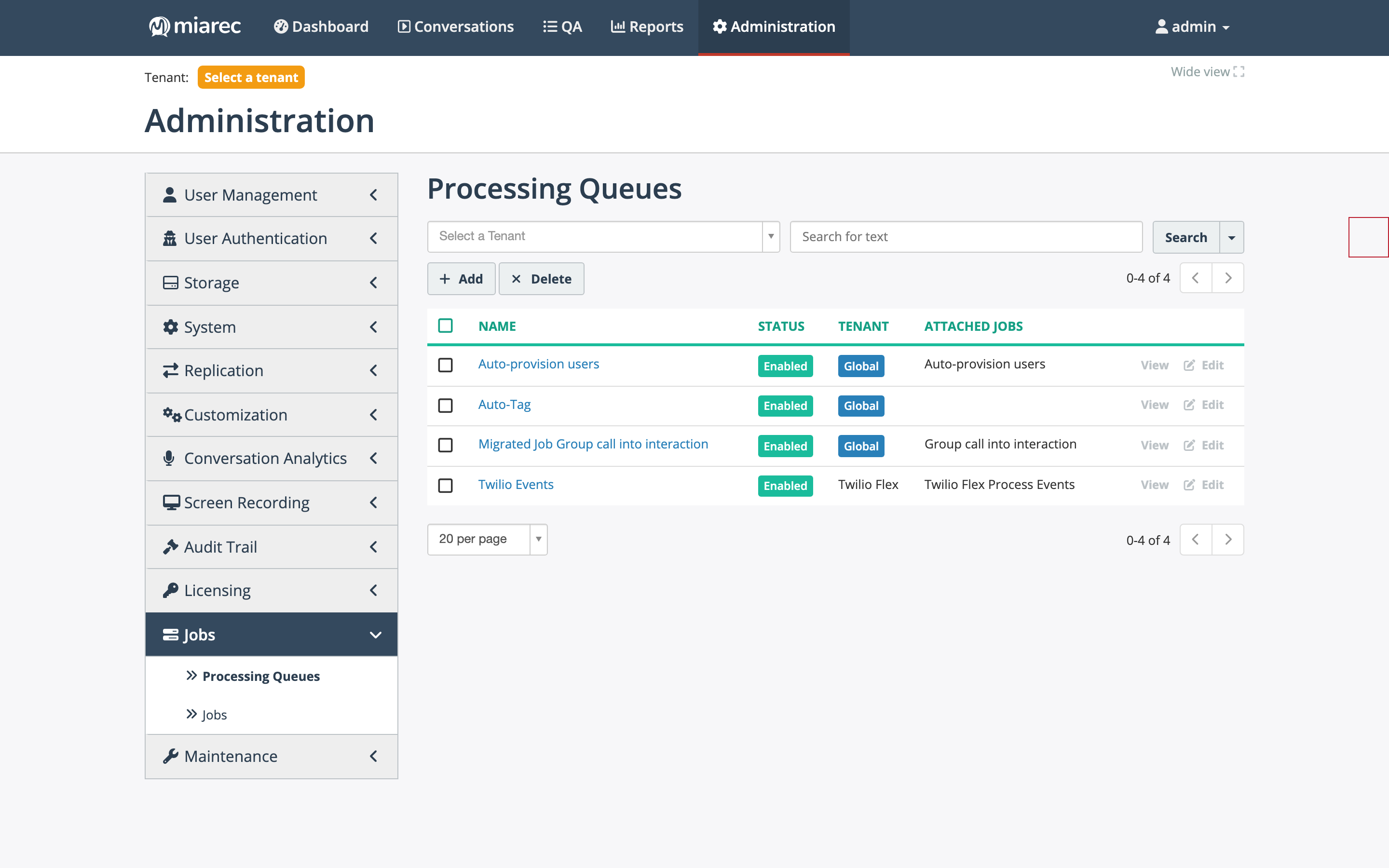
The Processing Queues page. Notice the Tenant column (a queue is Global or scoped to one tenant) and the Attached Jobs column showing which job consumes each queue — a queue with no attached job accumulates records that nothing processes.
Jobs do the work
Each stage is a persistent job with its own configuration, filters, schedule, run history, and logs, managed in the jobs console:
| Stage | Job type |
|---|---|
| Transcription | Transcribe recordings |
| AI tasks (summary, sentiment, topics, custom insights, Auto QA) | AI Assistant |
| Entity recognition | Recognize entities |
| Data redaction | Redact data |
A job's Filtering criteria decide which conversations it processes — this is where licensing is enforced (for example, transcribe only conversations of users holding the Conversation Analytics license). The full grouped catalog, including non-analytics jobs, is in the job type reference.
Where analytics configuration lives
The Administration › Conversation Analytics menu bundles configuration, usage metering, job monitoring, and results per feature — each page is tabbed:
| Menu item | Tabs | Operator pages |
|---|---|---|
| Transcription | Usage / Engines / Jobs / Results | Transcription |
| AI Tasks | AI Tasks / Global Tasks / Overrides / Usage / Engines / Jobs / Playground | AI tasks, Generative AI engines, Playground |
| Topic Analysis | topic list | administered per tenant — see the Administration Guide |
| Entity Recognition | Engines / Jobs | Entity recognition |
| Data Redaction | Rules / Jobs / Redacted / Highlighted | Data redaction |
What can stall the pipeline
- Engine unreachable or misconfigured — transcription or AI tasks fail; check the engine's Test a Connection and the job logs.
- Queue with no attached job — records accumulate and nothing downstream happens.
- Job filters excluding everything — the job runs but processes zero records.
- Tenant limits exhausted — requests are refused and counted as denied requests on the usage tabs; see Tenant configuration.
- Job stopped or failed — check Monitoring and troubleshooting for the transcription-focused checklist; the same techniques apply to every pipeline job.