License usage
Administration › Licensing › License usage is the operator's consumption view: how many seats of each type are in use across the system, tenant by tenant. Use it to spot tenants exceeding their limits, reconcile against contracts, and find where a "no license available" complaint comes from.
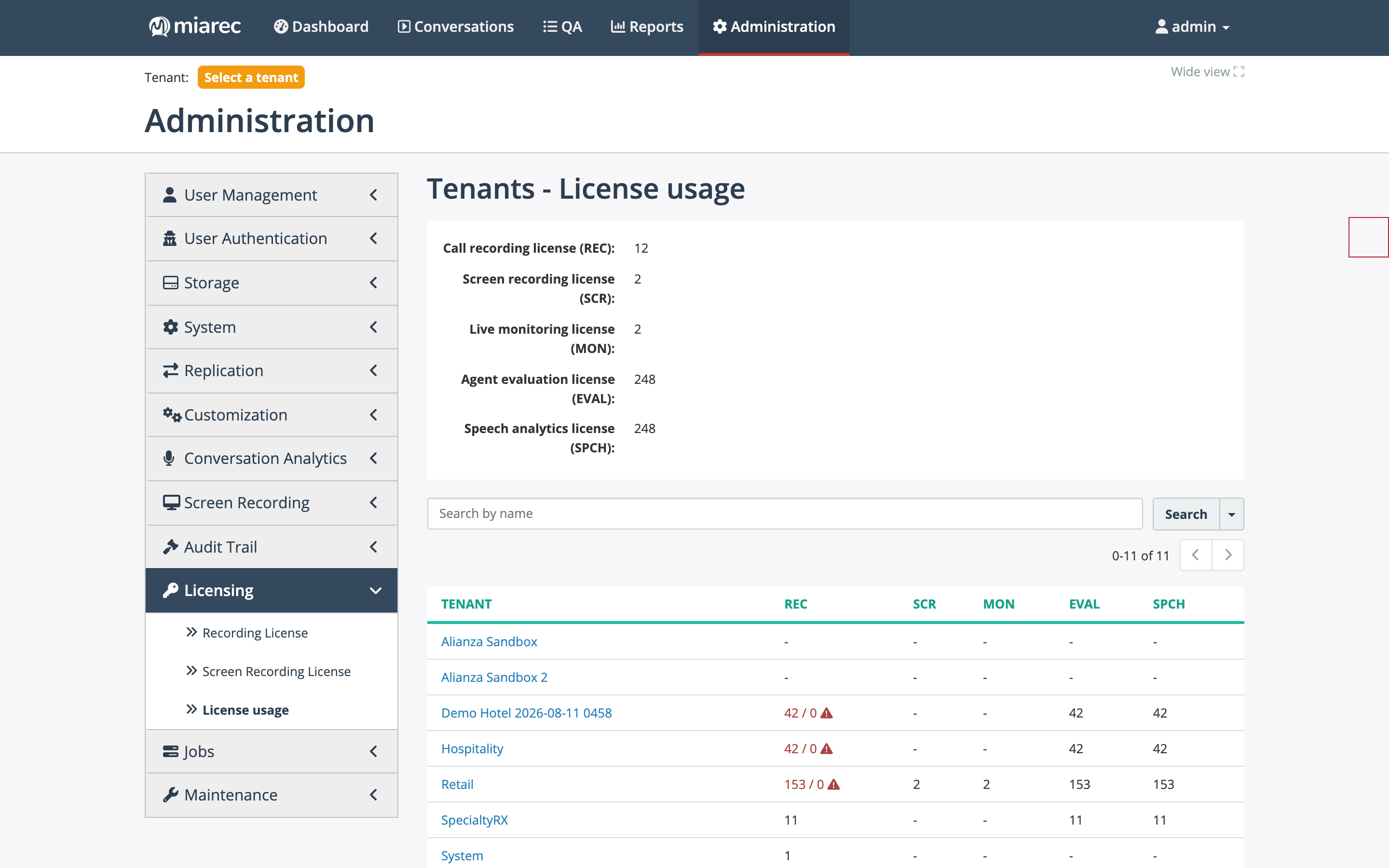
The License usage page. The header totals the seats in use per type (REC/SCR/MON/EVAL/SPCH); the table breaks them down per tenant. "42 / 0" with a warning icon means 42 seats are assigned against a limit of 0 — a license issue to resolve.
Reading the page
- The header lists the total seats currently in use for each of the five types — Call recording license (REC), Screen recording license (SCR), Live monitoring license (MON), Agent evaluation license (EVAL), Speech analytics license (SPCH).
- The table shows each tenant's usage per type. A dash means no seats of that type are assigned. When a tenant's assignments exceed its limit, the cell shows assigned / limit with a warning icon.
- Click a tenant to open its license view: the tenant's License limits next to its actual usage, with Groups and Users tabs breaking consumption down further — the fastest way to find exactly which users hold a seat type.
Fixing a license issue
A warning on this page means assignments exceed the tenant's limit (or the system pool). Either raise the tenant's limit (Edit Tenant › License limits, if the contract allows), or reduce assignments — unassign the seat from users who do not need it, on their user accounts or in bulk. Tenant administrators can re-distribute their organization's seats themselves; the limits are yours.
Where limits, keys, and assignment live
Licensing spans three places — this page is the reconciliation view across all of them:
| Piece | Where to change it |
|---|---|
| System-wide pools (key) | License keys |
| Per-tenant limits | Tenant page › License limits |
| Per-user assignment | The user's account (User accounts); defaults for new users via auto-provisioning |
License columns in reports
License data is also available as report columns for scheduled reconciliation:
- User license columns (in Calls Summary and User Details report types): User - License - Call Recording, … - Screen Recording, … - Live Monitoring, … - Agent Evaluation, … - Conversation Analytics — the number of seats of that type assigned to each user. (The report column already uses the "Conversation Analytics" name even though the license field label is still "Speech analytics license".)
- Tenant reports include per-tenant license columns (License - …) alongside storage and usage columns — see Tenant reports.
Related pages
- Licensing overview — the seat types and what they gate.
- License keys — the system-wide pools.