Topics
A topic is a named subject your organization wants to detect in conversations — for example "Pricing inquiry", "Order cancellation", or "Frustration". The AI reads each transcript and identifies which of your organization's topics were discussed, based on each topic's description. One conversation can match several topics.
Note
The topic list itself is defined by your administrator — see Configuring topics in the Administration Guide. If no topics appear anywhere, topics may not be configured for your organization yet.
Where topics surface
Topics appear in three places:
- the Topics dashboard tab — distribution and trends across your organization;
- search — topic parameters in advanced search;
- the conversation detail page — a Topics section at the bottom of the Analytics tab.
Topics on a conversation
- Open a conversation and click the Analytics tab.
- Scroll to the Topics section at the bottom of the tab.
For each detected topic you see the color-coded topic label, an explanation of why the topic is relevant, a relevance score, and quotes — timestamped phrases from the conversation that represent the topic.
The Topics section at the bottom of the Analytics tab lists each detected topic with its explanation, relevance score, and timestamped quotes.
Note
Not every conversation matches a topic. If the Topics section is missing or empty for a particular conversation, the AI did not detect any of your organization's topics in it.
Topics dashboard
The Topics dashboard tab shows how much of your conversation volume each topic drives: counters for the number of topics and the biggest topic by conversations and by minutes, plus a per-topic table with total conversations, average duration, and total talk time. Click a topic to drill into it. See Topics dashboards.
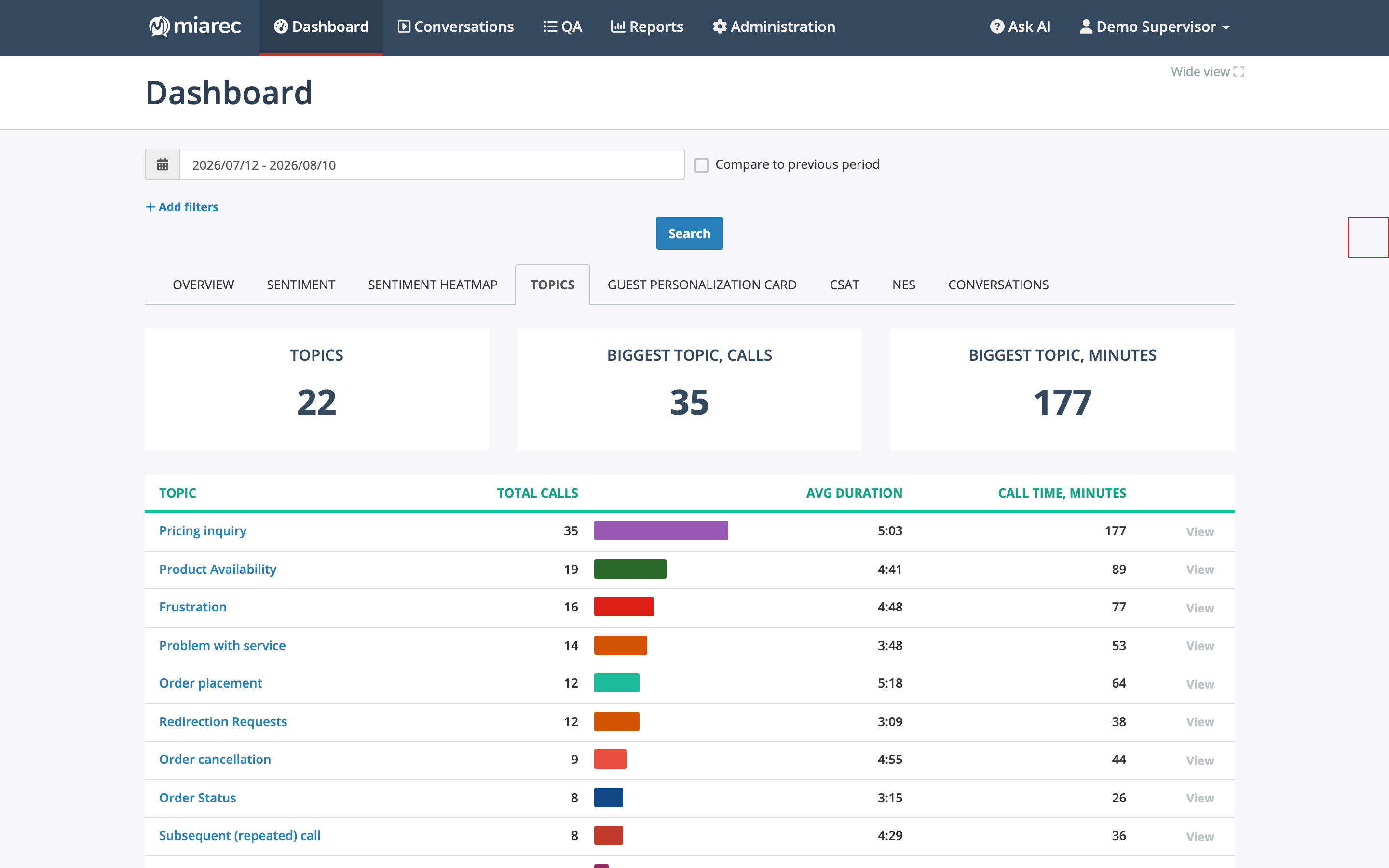
The Topics dashboard tab. The per-topic table ranks topics by conversation count; the View link opens the matching conversations.
Search by topic
In advanced search, use the Call - Topic parameter with a condition such as Is, One of, or Is set (available), then pick topics from the list. Combine topic filters with other criteria — date range, duration, direction, sentiment — to focus your investigation.
Related pages
- Topics dashboards — trends and per-topic drill-down.
- AI insights — the rest of the Analytics tab.