System Operator Guide
This guide is for the people who run the MiaRec platform itself: MiaRec staff and partner (service provider) technical teams who provision tenants, manage licenses and platform authentication, operate the ingestion and processing infrastructure, and keep the system healthy. It assumes full administrative access to the System tenant — the operator-owned tenant on a multitenant deployment.
Unlike the customer-facing guides, this guide freely discusses multi-tenancy, cross-tenant tools, and platform-level settings. If you administer a single organization's portal, see the Administration Guide instead; day-to-day usage is covered by the User Guide, and shared concepts by Overview & Key Concepts.
The platform at a glance
A MiaRec deployment consists of several cooperating components:
- Web portal — the application users and administrators sign in to; also the home of every page described in this guide (the Administration menu).
- Recorder — the capture engine that records calls from the connected phone systems. Recording is one ingestion method among several: conversations also arrive through telephony integrations (Teams, Twilio, Webex, …), third-party recorder imports, and manual or API uploads.
- Background workers (jobs) — the processing pipeline that transcribes conversations, runs AI tasks, redacts data, enforces retention, and synchronizes with external platforms.
- Speech and AI engines — configured connections to speech-to-text, generative AI, and entity recognition services used by the pipeline.
What operators do
As a system operator, working from the System tenant you:
- Create and configure tenants — isolated customer organizations — and their limits (Tenant management).
- Manage license keys, per-tenant license limits, and seat usage (Licensing).
- Run platform authentication: SAML identity providers, two-step verification methods, and system-wide password policy defaults (Platform authentication).
- Operate ingestion and recording infrastructure, storage, and replication.
- Configure and monitor the Conversation Analytics pipeline — transcription engines, AI tasks, generative AI engines — and Quality Assurance operations.
- Watch jobs, queues, system status, logs, and the cross-tenant audit trail.
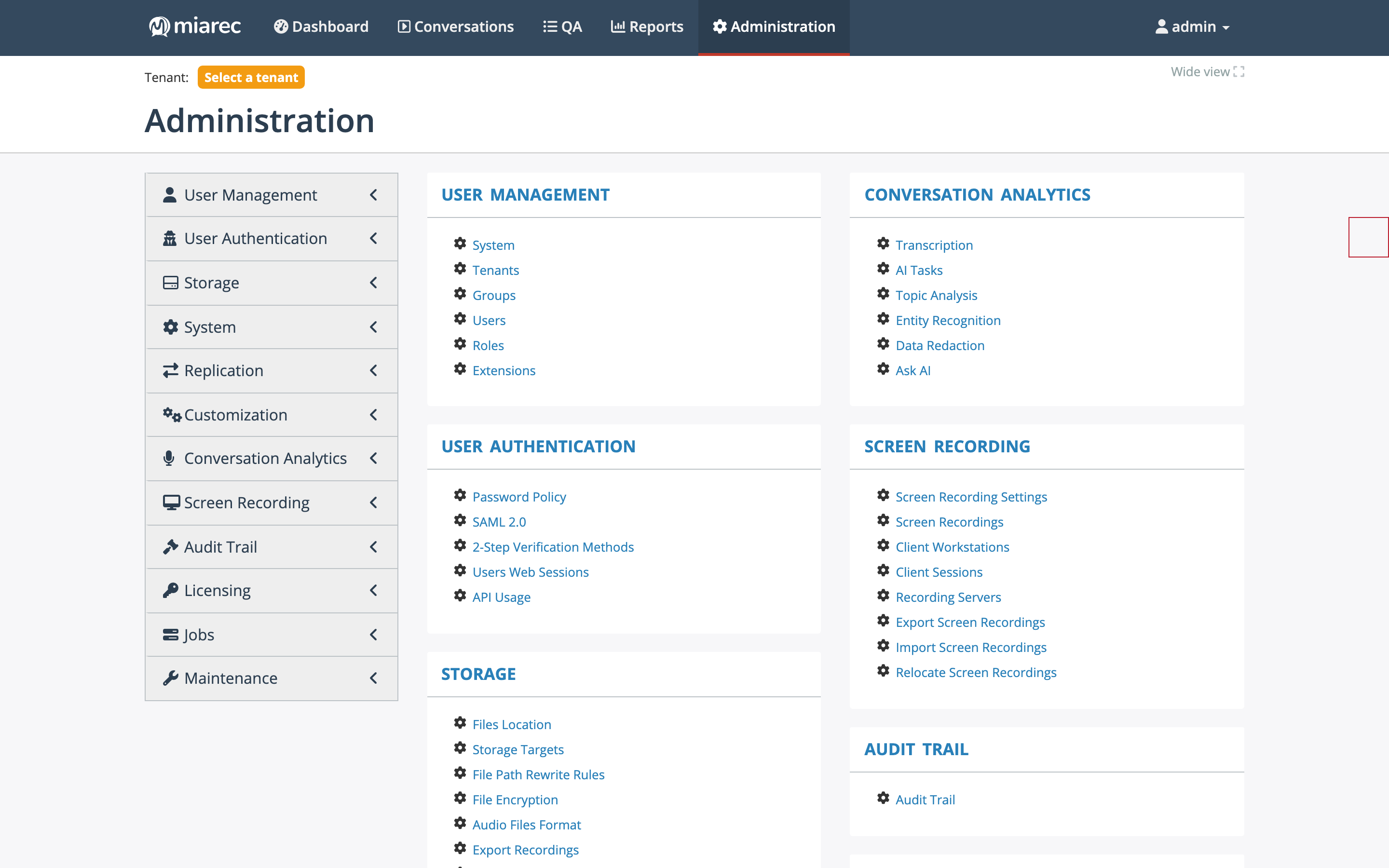
The Administration home page as seen by a root operator in the System tenant. Compared with a customer administrator, the menu adds the Tenants, Extensions, Licensing, Replication, and Maintenance sections (and the System tenant context); shared sections such as User Authentication gain extra entries like SAML 2.0 and 2-Step Verification Methods.
How this guide relates to the customer guides
Many Administration pages serve both operators and customer administrators — the product does not visually separate the two audiences. This guide covers the platform side; when a setting has a customer-facing counterpart, the page links to the Administration Guide. For example, the system-tenant password policy provides the defaults that each organization's own password policy falls back to.
"Tenant" wording
This guide uses the term tenant for an isolated customer organization. The customer-facing guides deliberately never use it — they say "your organization" instead. Keep that distinction in mind when communicating with customers.
What's in this guide
- Tenant management — multi-tenancy, onboarding, tenant configuration, extensions, and view-as and impersonation.
- Licensing & packaging — the license model, license keys, and usage.
- Platform authentication — SAML identity providers, two-step verification methods, password policy defaults, portal authentication, and sessions and API usage.
- Ingestion & recording infrastructure — recording interfaces, recording rules, recorder servers, integrations, and uploads.
- Storage & data lifecycle — file locations, storage targets, encryption, limits, retention, and backup.
- Replication — multi-master asynchronous replication.
- Conversation Analytics operations — the processing pipeline, transcription, AI tasks, and engines.
- Quality Assurance operations — how Auto QA runs.
- Jobs & processing pipeline — queues and the jobs console.
- Monitoring & maintenance — system log, system status, audit trail, and troubleshooting tools.
- Platform services — email, localization, and advanced settings.
- Reporting on tenants — the cross-tenant dashboard, global reports, and tenant reports.
- Screen recording operations.