Overview
This guide explains how to connect MiaRec to phone platforms that are served by Alianza Crux.
Alianza Crux connects a service provider's Alianza phone platform (Alianza One, Fusion, or Core) to AI and analytics services such as MiaRec. A business whose phone service runs on Alianza can turn on MiaRec without a separate integration project with its service provider: the business checks that its phone number is supported, authorizes MiaRec, and MiaRec sets up the connection through Alianza Crux.
Note
Alianza Crux is in controlled availability. This guide describes the MiaRec side of the integration. The service provider's setup of Alianza Crux is provided by Alianza.
Prerequisites
- Phone service on an Alianza platform that is enabled for Alianza Crux. Lines on Alianza One and Alianza Fusion are available to Alianza Crux automatically. Alianza Core operators enable Alianza Crux with Alianza.
- Tenant administrator access to MiaRec, and a sign-in with the phone platform provider for the business. See Tenant administrator configuration.
How it works
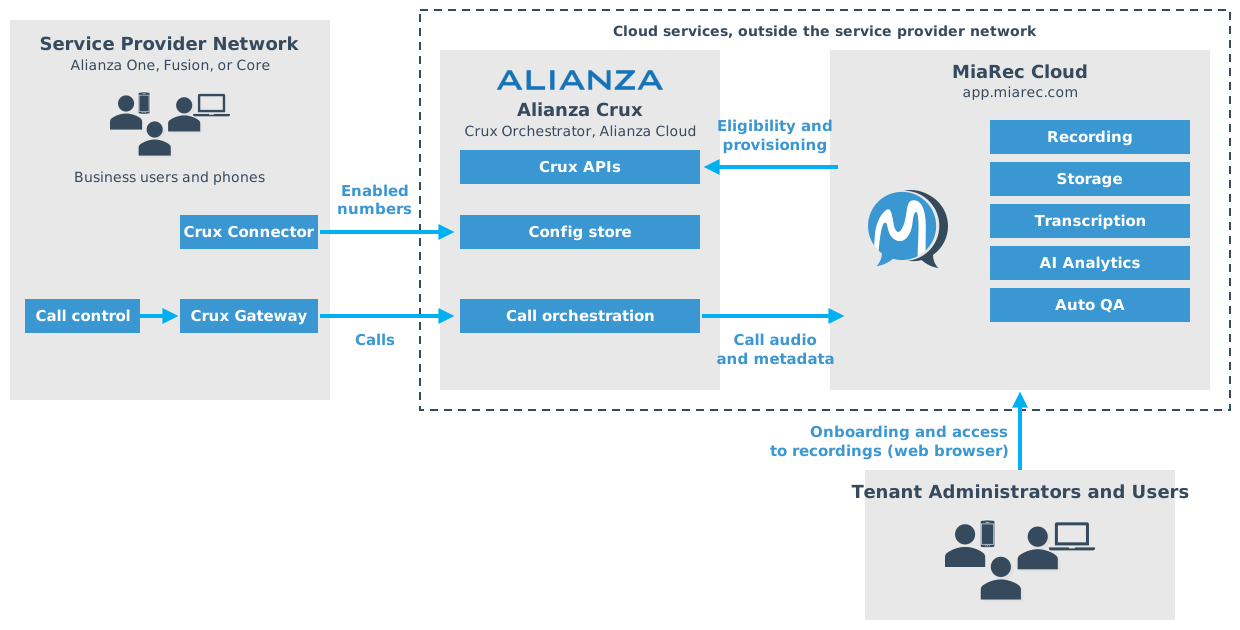
Alianza Crux and MiaRec are cloud services. Neither runs in the service provider network: only the Crux Connector and the Crux Gateway do.
- A tenant administrator connects the business. The administrator enters one of the business's phone numbers, and MiaRec asks Alianza Crux whether the number is supported. No sign-in is needed for this check.
- The tenant administrator authorizes MiaRec. If the number is supported, the administrator signs in with the phone platform provider and authorizes MiaRec (OAuth 2.0). MiaRec then creates the Alianza Crux resources that link the business to MiaRec.
- Alianza Crux sends the business's calls to MiaRec. Calls are placed and received on the Alianza phone platform as usual. In the service provider network, the Crux Connector tells Alianza Crux which phone numbers are enabled, and the Crux Gateway passes their calls to the Crux Orchestrator in the Alianza cloud. The Orchestrator delivers the call audio and metadata to the MiaRec cloud.
- The recording appears in the MiaRec web portal, where it is transcribed and analyzed:
- Transcription
- Sentiment analysis
- Topic and keyword analysis
- Call summary
- Manual and automated QA using the AI assistant
- AI insights, like "Next Actions" and "Key Facts"
Access to recordings is through a web browser, and is controlled with role-based access control.
To disconnect, the tenant administrator reverses step 2: MiaRec removes the Alianza Crux resources it created.
How the integration is named in MiaRec
The MiaRec screens that tenants see call this integration Other phone platform, not Alianza.
Terminology
- Eligibility validation: the automatic check of whether a phone number can be activated, run before any sign-in.
- Experience: the Alianza Crux service definition for MiaRec, which an organization is attached to.
- Experience Account ID: the provider account of a connected organization.
- Experience Connection: the provider resource that links an organization to the Experience.
- Experience Assignment: the provider resource that assigns the Experience to the account.
- E.164: the international phone number format:
+, the country code, then the number, for example+14155551234.
Next steps
- Tenant administrator configuration: connect an organization, test the connection, and disconnect.