Everything the platform sends by email — password resets, welcome emails, 2FA codes, job notifications, report deliveries, shared conversations — goes through one system-wide SMTP integration, configured at Administration › System › Email Integration. The same page hosts the catalog of editable email templates.
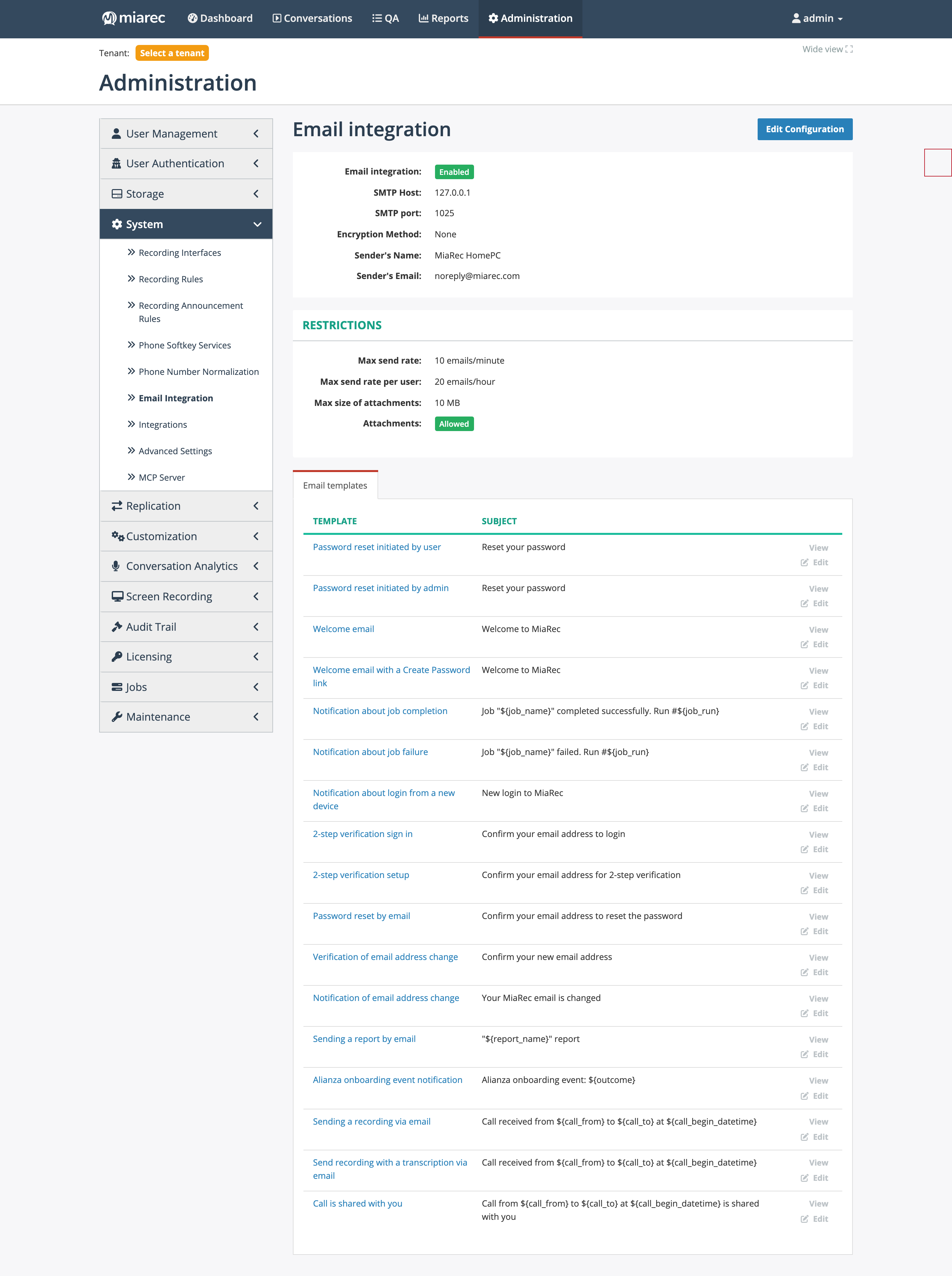
The Email integration page: SMTP connection and sender at the top, sending restrictions in the middle, and the email template catalog below — every message the platform sends has a template row here with View and Edit actions.
SMTP configuration
Click Edit Configuration to set:
- Enable Email integration — the master switch; with it off, nothing is sent.
- SMTP host and SMTP port — usually 25 for non-encrypted connections, 465 for SSL, 587 for TLS/STARTTLS.
- Encryption Method and optional authentication (SMTP user and password).
- Sender's Name and Sender's Email — the From identity on all platform email.
The edit form includes a Test Email Recipient field and a Test SMTP settings button, so you can verify delivery before saving.
Restrictions
- Max send rate (emails/minute, system-wide) and Max send rate per user (emails/hour).
- Max size of attachments (MB) and an Attachments switch — whether users may attach recording and metadata files to an email at all.
Email template catalog
Each template defines the subject and body (plain text and HTML) of one message type, with ${parameter}
placeholders substituted at send time. View shows the template with its parameter reference
(name, description, example value); Edit lets you customize the wording, and a test send is available
so you can check the result. The catalog:
| Template | Sent when |
|---|---|
| Password reset initiated by user | A user requests a password reset |
| Password reset initiated by admin | An administrator triggers a reset for a user |
| Welcome email | A new user is created with a known password |
| Welcome email with a Create Password link | A new user must set their own password |
| Notification about job completion / about job failure | A job finishes, per the job's notification policy — see Jobs console |
| Notification about login from a new device | A user signs in from an unrecognized device |
| 2-step verification sign in / setup | An email 2FA code is needed at sign-in or during enrollment |
| Password reset by email | A user confirms their address to reset a password |
| Verification of email address change / Notification of email address change | A user changes their email address |
| Sending a report by email | A scheduled or manual report delivery — see the User Guide Reports chapter |
| Alianza onboarding event notification | An Alianza integration onboarding event occurs |
| Sending a recording via email / Send recording with a transcription via email | The Send recordings via email job or a manual send delivers a conversation |
| Call is shared with you | A user shares a conversation with someone |
The conversation-delivery templates expose conversation parameters (calling/called party name and number, begin and
end date/time, duration, a link to the recording); the account templates expose user and link parameters.
Placeholders must be kept as ${name} — the parameter table on each template's page is the authoritative
list for that template.
Related pages
- Two-step verification methods — email as a 2FA channel depends on this integration.
- Jobs console — job completion/failure notifications.