Call scenarios
This article shows how each kind of Genesys Cloud call appears in MiaRec.
How to read the diagrams and screenshots
Two rules apply to every call:
- One Genesys Cloud conversation is one call in MiaRec. A transfer, a consultation, a conference, or a callback doesn't split the call. All agents who took part are participants of the one call.
- One Genesys Cloud recording is one audio file of the call. Most calls have one file. A callback has two.
Each diagram shows one call in Genesys Cloud. Each row is a participant, and the colors show what the participant does. The last row shows which part of the call is in the audio file.
Each screenshot shows the same kind of call in MiaRec. Under Participants, each bar starts when the participant joins and ends when the participant leaves, and the participants are in the order in which they joined. The light part is the time before the participant answered (ringing or dialing), and the dark part is the time connected. Select the plus sign to see the exact times. A call with two participants has no such panel: both are under Caller party and Called party. See Who is listed under Participants?
What is in the audio depends on your Genesys Cloud settings
The diagrams show Genesys Cloud with trunk recording, and without the IVR and hold audio. With other settings, the audio file can also include the IVR, the queue wait, or the hold. See Choose what is in the audio.
The rules for the values that MiaRec shows are in What call details are shown in MiaRec?
Supported scenarios
| Scenario | Calls in MiaRec | Audio files |
|---|---|---|
| Inbound call | 1 | 1 |
| Call with hold | 1 | 1 |
| Outbound call | 1 | 1 |
| Outbound call on behalf of a queue | 1 | 1 |
| Callback | 1 | 2 |
| Blind transfer | 1 | 1 |
| Consult transfer | 1 | 1, or 2 when Genesys Cloud records consults |
| Conference | 1 | 1 |
| Agents who don't answer | 1 | 1 |
| Abandoned call | 1 | 1 or none |
| IVR-only call | 1 | 1 or none |
| Voicemail | 1 | None |
| Other cases |
Inbound call
A customer calls, goes through the IVR and a queue, and talks to an agent.
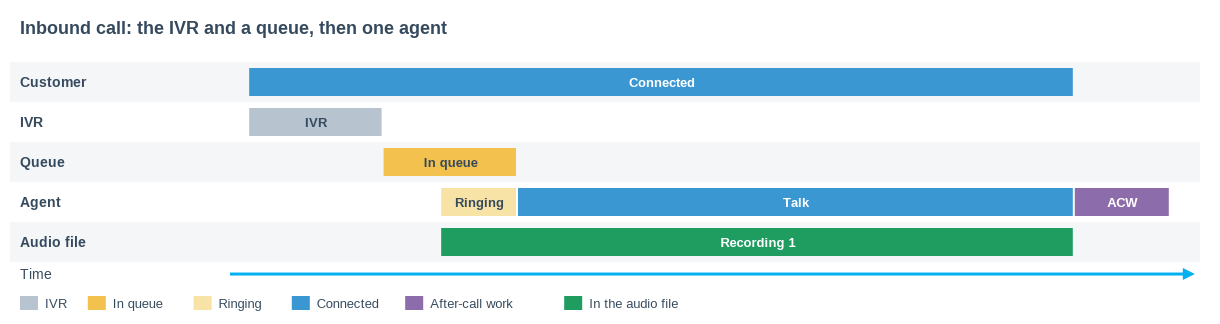
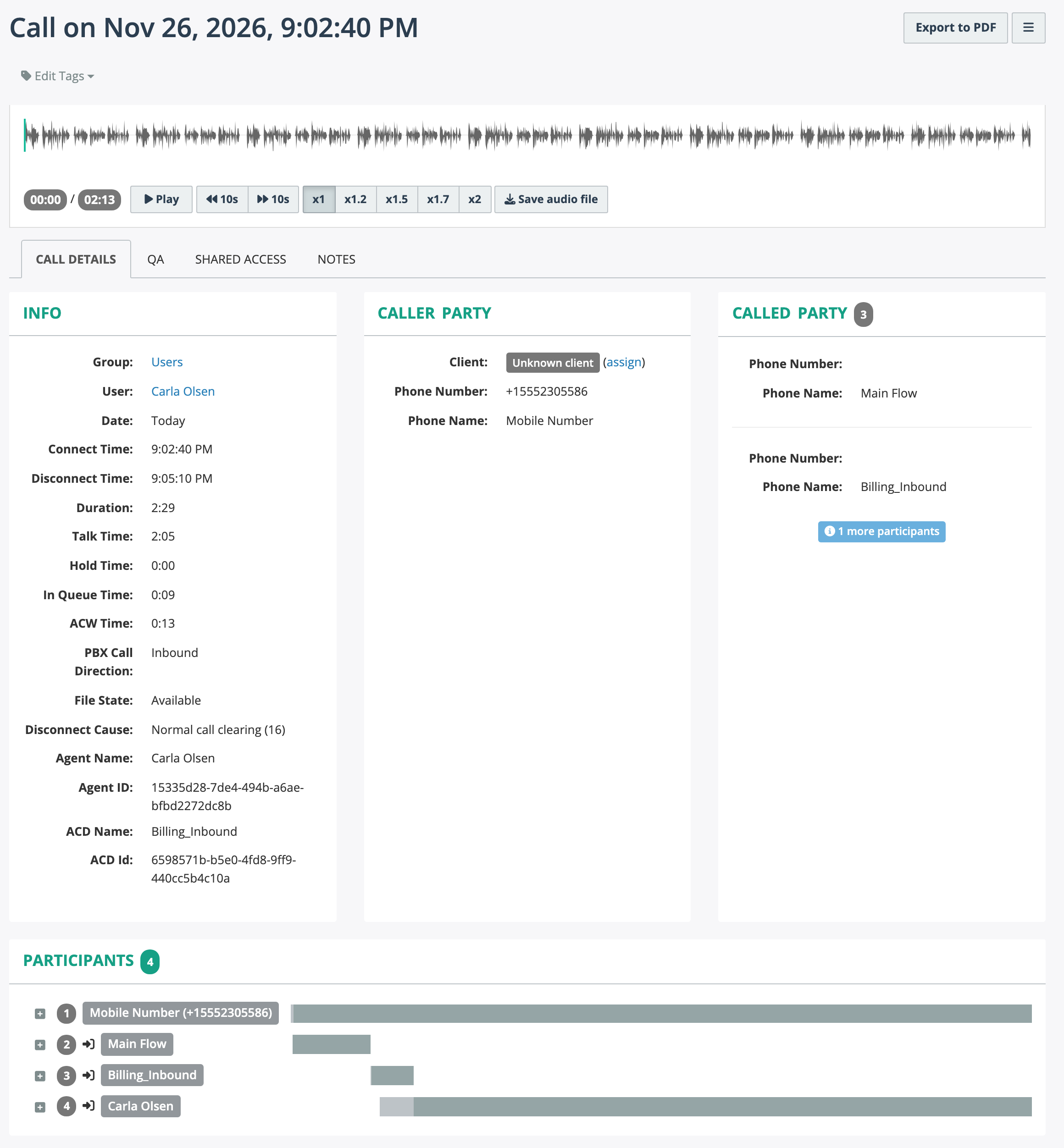
- Caller party is the customer. Called party lists the IVR flow, the queue, and the agent.
- The customer is the first participant, and joins when the call starts.
- User and Agent Name are the agent who answered. ACD Name is the queue.
- Duration is the whole call: from the time when the customer joined until the last participant left. It includes the IVR and the queue wait, and doesn't include the after-call work.
- The audio is shorter than the duration, because the IVR part isn't in the audio. The player shows the length of the audio.
- Phone Name of the customer is the name that Genesys Cloud reports, for example
Mobile Number.
Call with hold
The agent puts the customer on hold, and then continues the conversation.
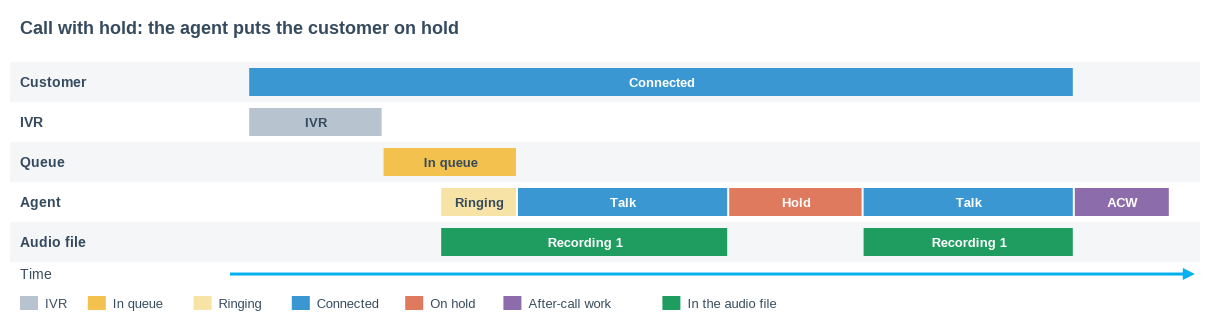
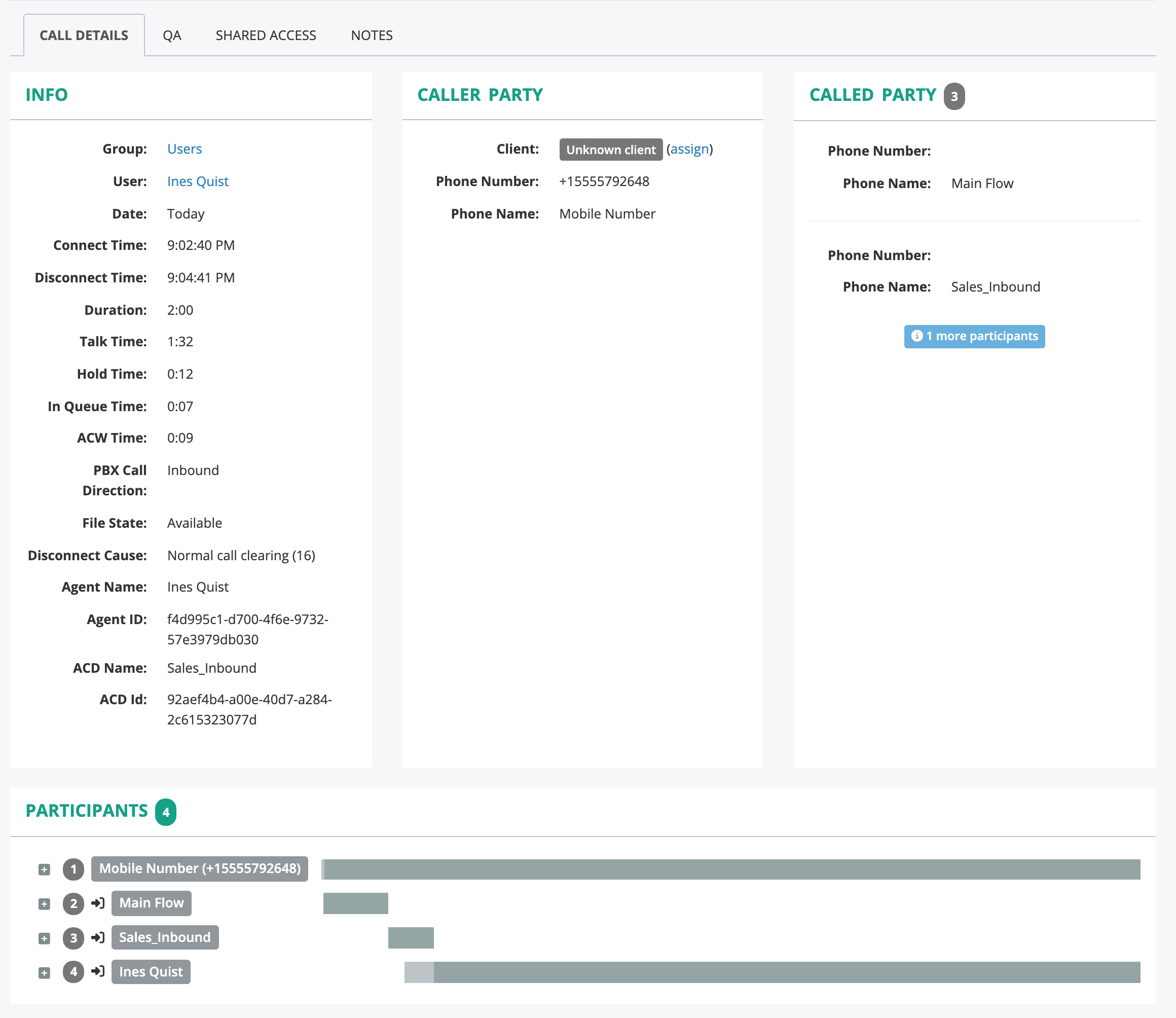
- The hold isn't in the audio, unless Holds is selected in the recording settings of the trunk. Genesys Cloud cuts the hold out, and plays a 1.5-second tone where it starts. See Choose what is in the audio.
- After the hold, the audio is earlier than the call times suggest. For example, after a 30-second hold, what you hear 2 minutes into the audio was said about 2 minutes and 28 seconds after the audio started. See Why is the audio shorter than the call?
- The Participants timeline shows the agent as connected during the hold. The hold time is in Hold Time. See How to view, search by, and report on Talk, Hold, In Queue, and ACW time?
Outbound call
An agent dials an external number, not on behalf of a queue.
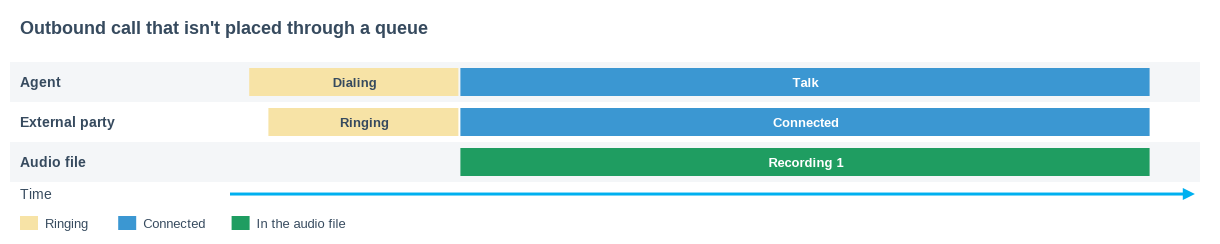
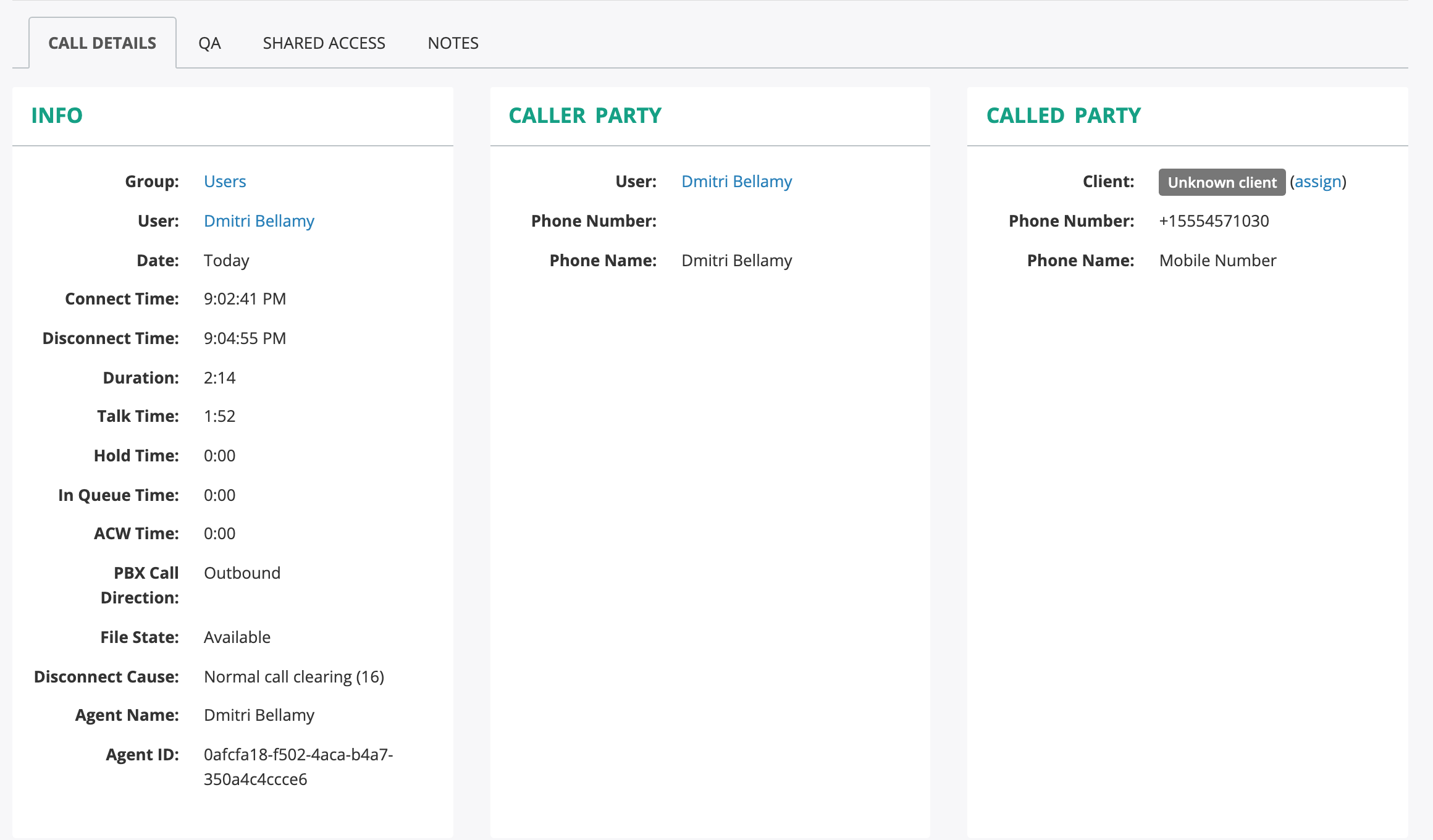
- Caller party is the agent, and Called party is the external number.
- The phone number of the agent is empty. Genesys Cloud reports an internal softphone address for the agent, which MiaRec doesn't show.
- ACD Name is empty, because the call has no queue. There is usually no after-call work.
- The recording starts when the external party answers, so it doesn't include the ringing.
Outbound call on behalf of a queue
An agent selects a queue, and then dials an external number.
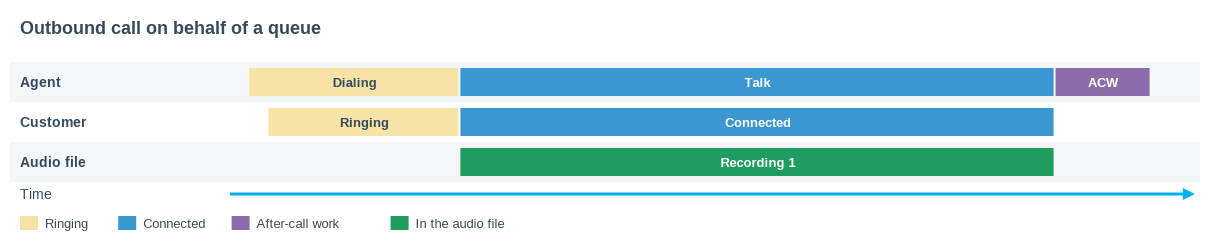
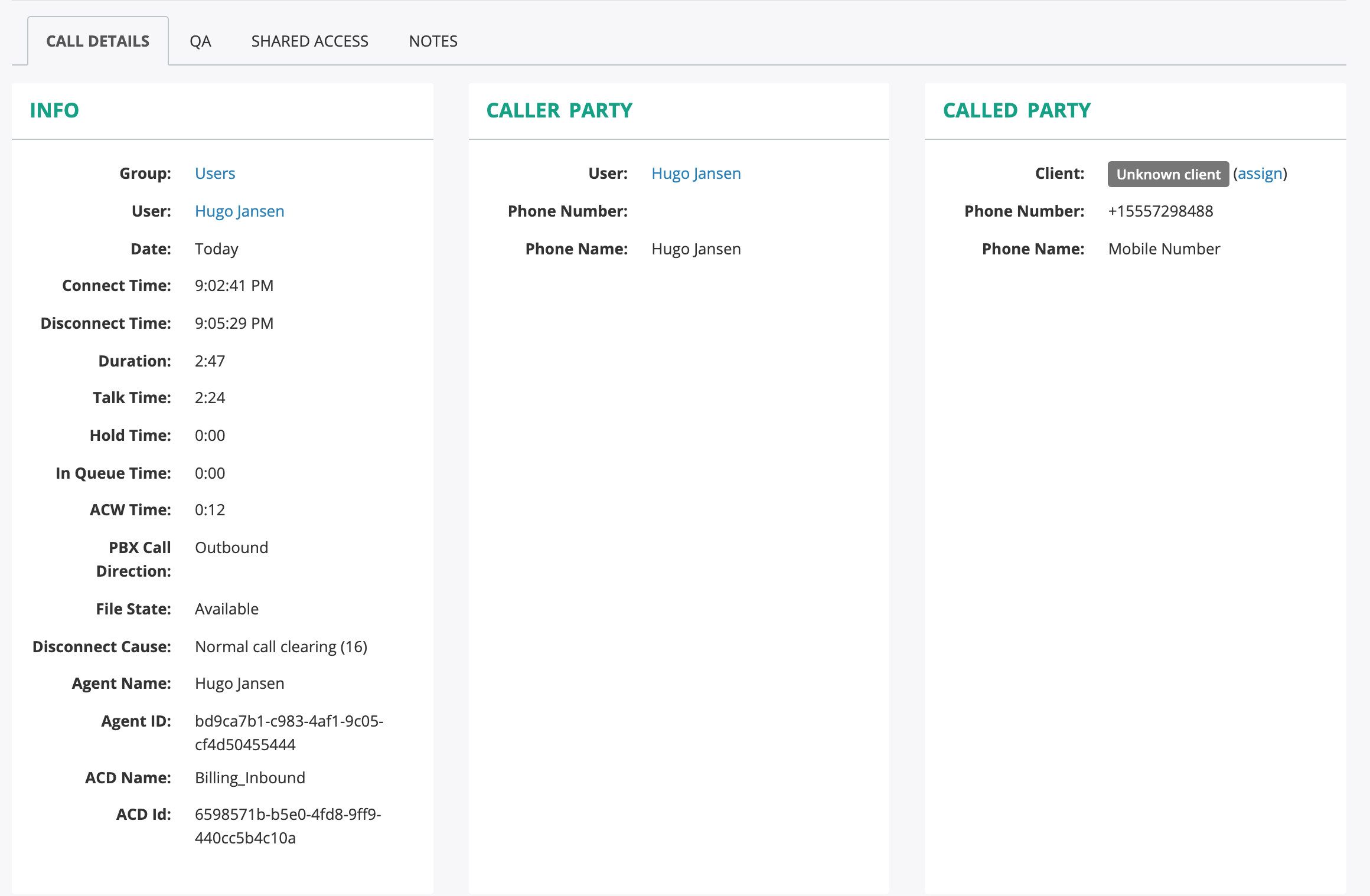
- The call looks like a direct outbound call, with the queue in ACD Name. The queue isn't a participant, because nobody waited in it.
- The call has after-call work, so it's completed only when the agent finishes it.
Callback
A customer requests a callback while waiting in the queue, and hangs up. Later, an agent calls the customer back.
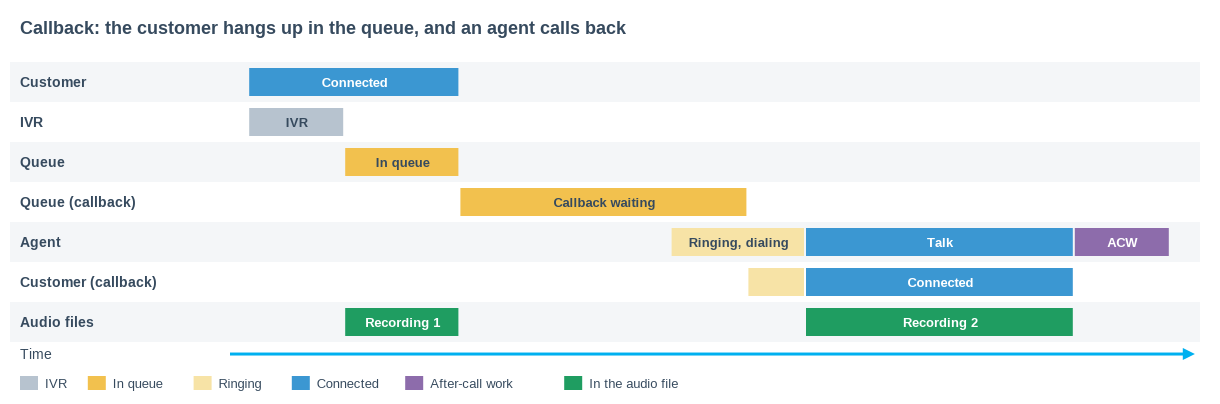
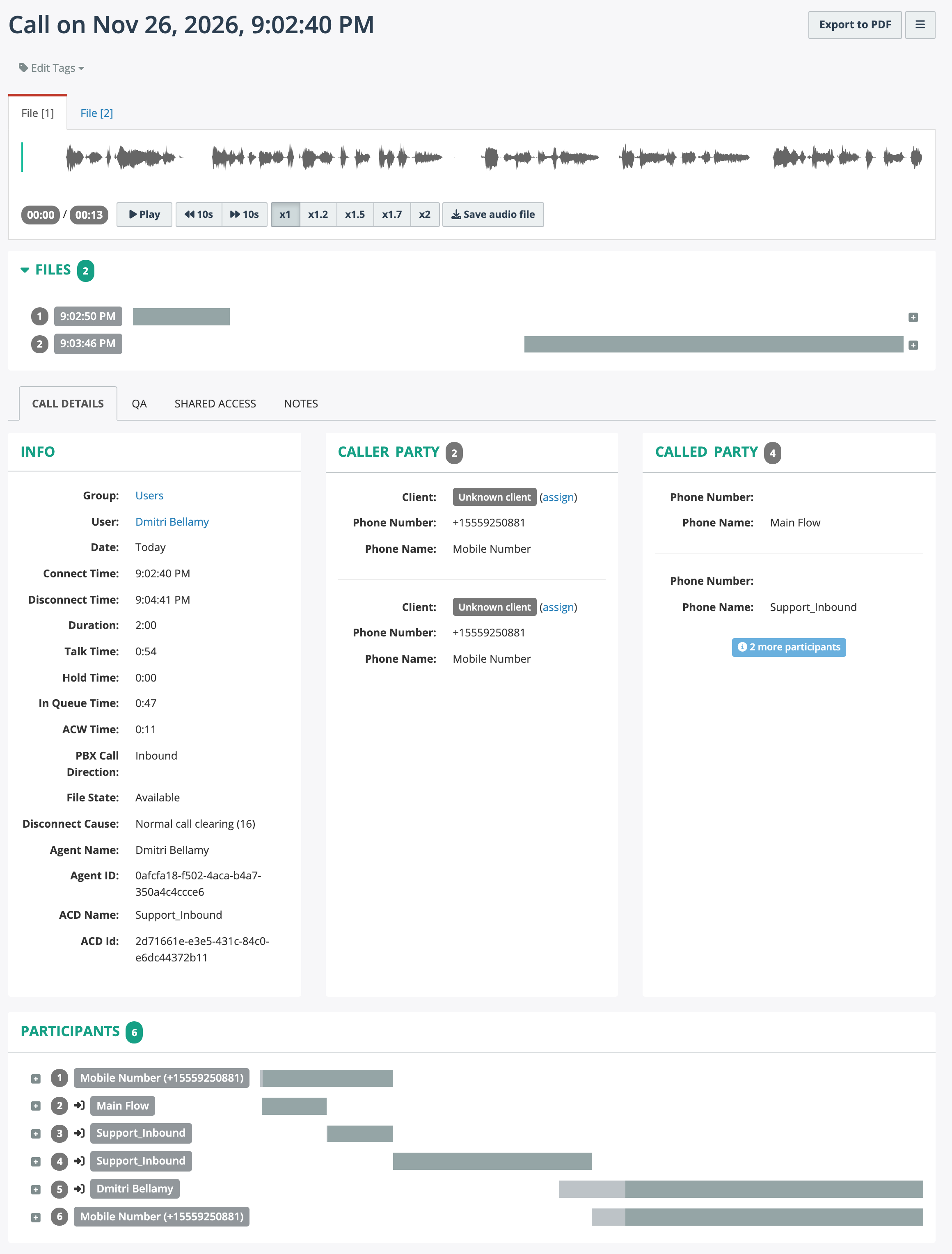
- The callback is one call with two audio files: the customer's inbound call, and the conversation with the agent. Select File [1] or File [2] in the player. The Files panel shows when each file starts.
- PBX Call Direction is Inbound, because the customer called first.
- The customer and the queue are listed twice: once for the inbound call, and once for the callback.
- Duration includes the wait between the two. A callback that an agent makes an hour later has a duration of more than an hour. Use Talk Time to measure the conversation.
- In Queue Time includes the time when the callback waited for an agent. For a callback that the customer scheduled for later, the time until the callback is due doesn't count.
- Talk Time starts when the customer picks up. The time while the customer's phone rings doesn't count.
- If the customer doesn't pick up, the agent didn't answer the call, and the call has no talk time for this agent.
- The call stays in progress while the callback waits in the queue, for hours or days if needed. The call back and its recording become part of the same call. A callback that no agent takes within the Maximum callback wait of the job (30 days by default) is completed as it is. See Synchronization jobs.
Blind transfer
An agent transfers the customer to another queue, and leaves the call.
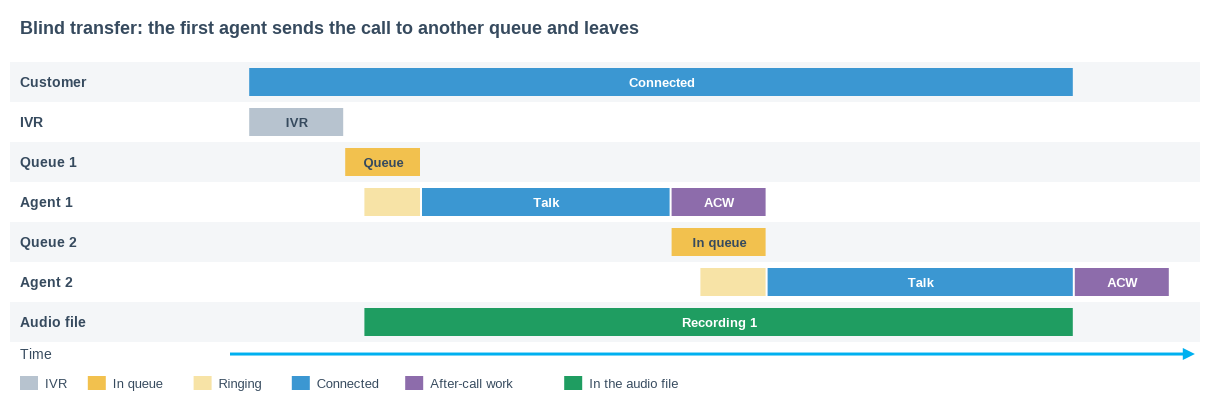
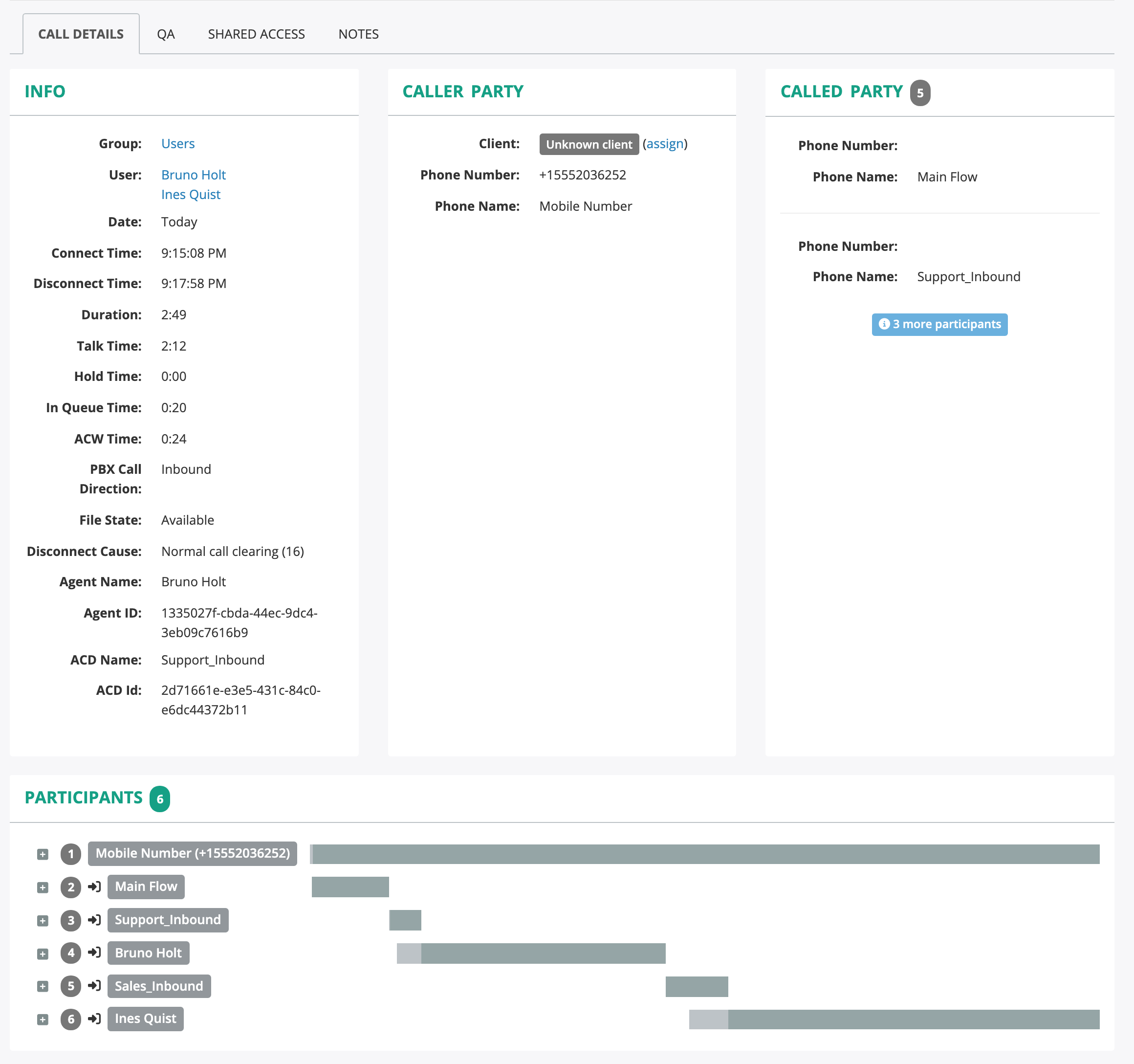
- Both agents are in User, so the call is found when you filter by either of them.
- Agent Name is the agent who answered first, and ACD Name is the first queue. The second agent and queue are under Participants.
- The audio is one file for the whole call.
- ACW Time is the sum of both agents' after-call work.
Consult transfer
An agent puts the customer on hold, talks to a second agent, and then hands the call over.
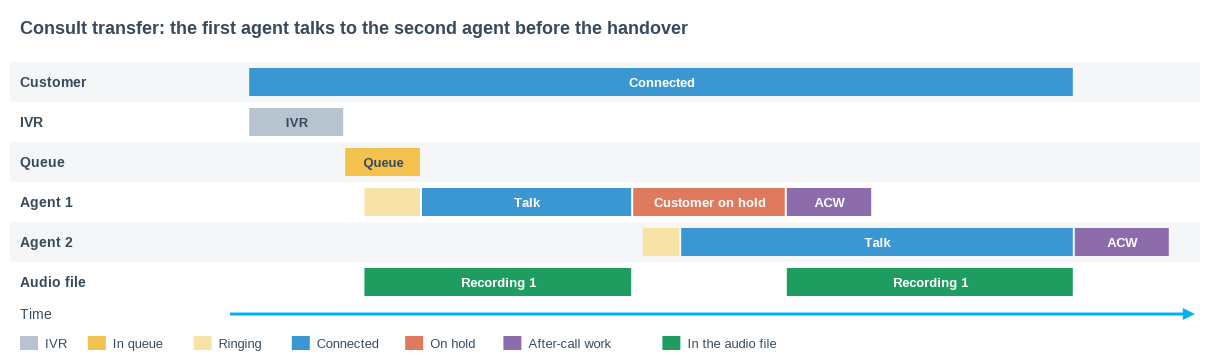
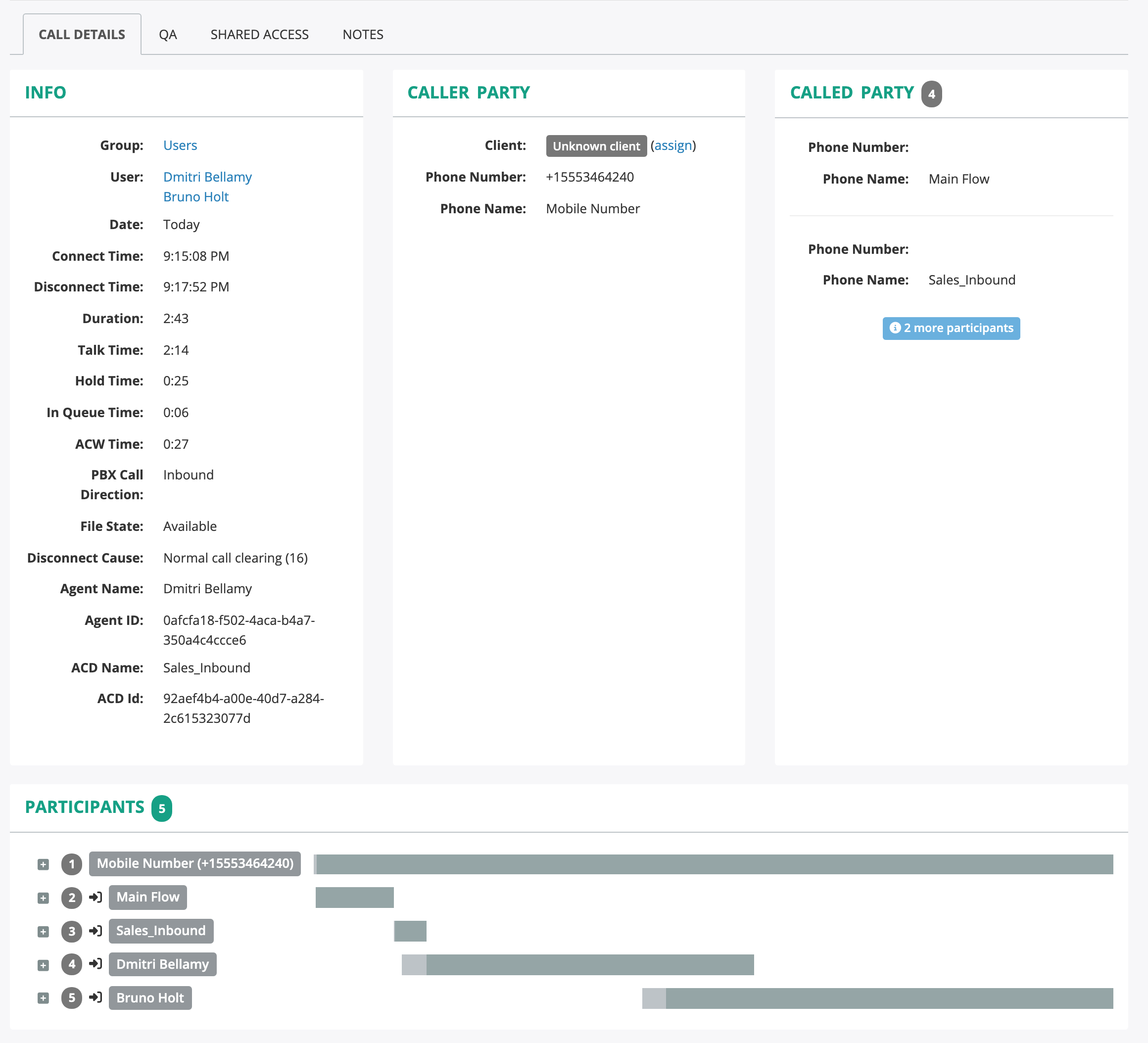
- The two agents overlap: the second agent joins before the first agent leaves.
- The conversation between the two agents isn't in the audio, unless Consults is selected in the recording settings of the trunk in Genesys Cloud. Genesys Cloud then creates a second recording for the consultation, and the MiaRec call has two audio files. See Choose what is in the audio.
- The talk time of the second agent includes the consultation, as Genesys Cloud reports it.
Conference
A second agent joins the call, leaves, and joins again.
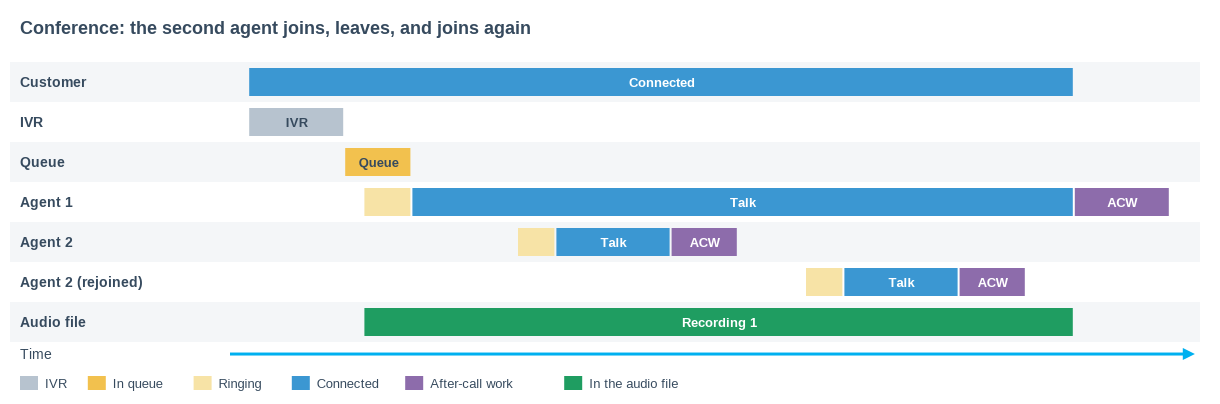
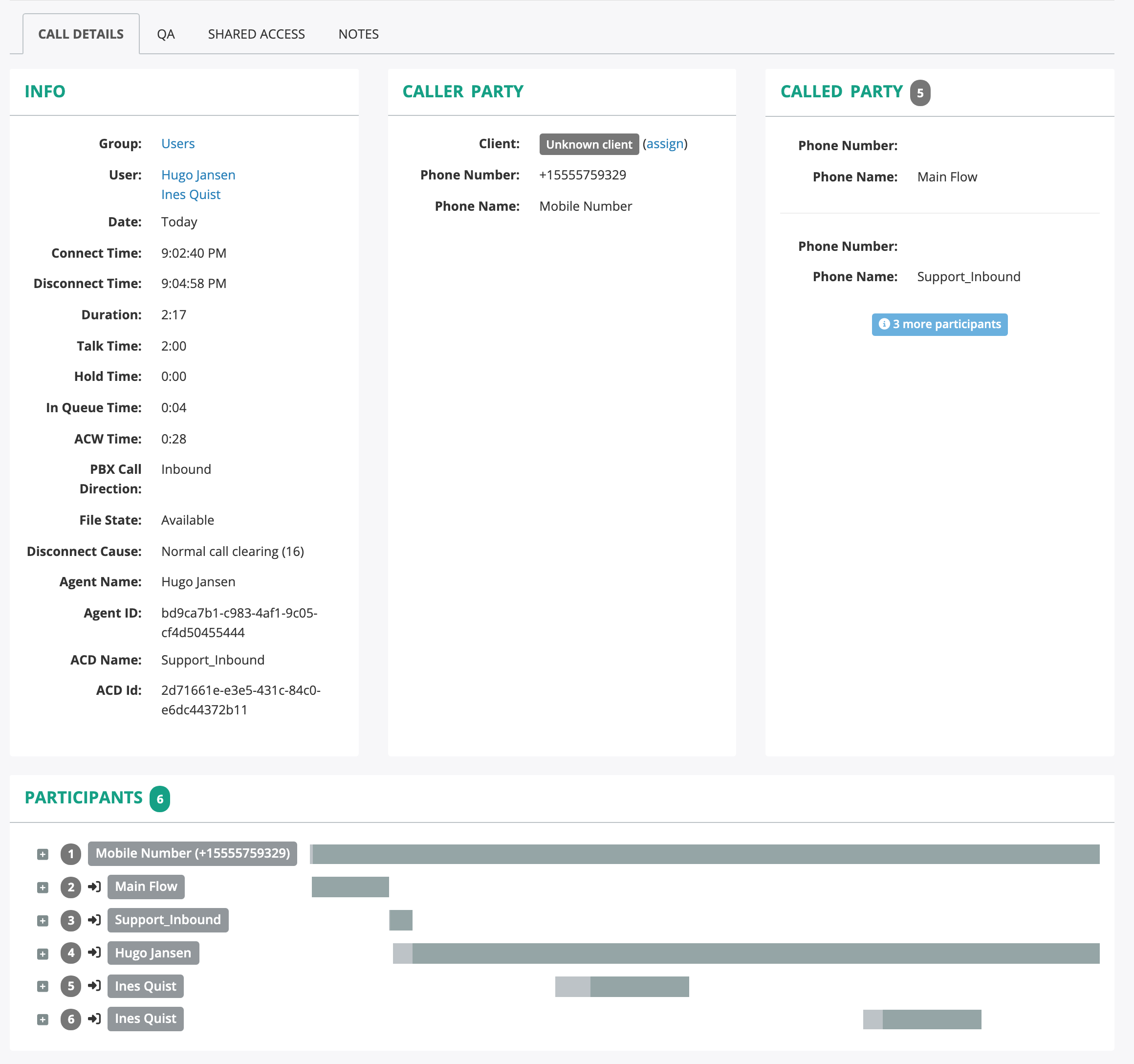
- All participants are in one call with one audio file, which has the audio of all of them.
- An agent who leaves and joins again is listed twice, with the times of each visit.
- Talk Time counts the time when two agents talk at once only once.
Agents who don't answer
The queue alerts several agents, and one of them answers.
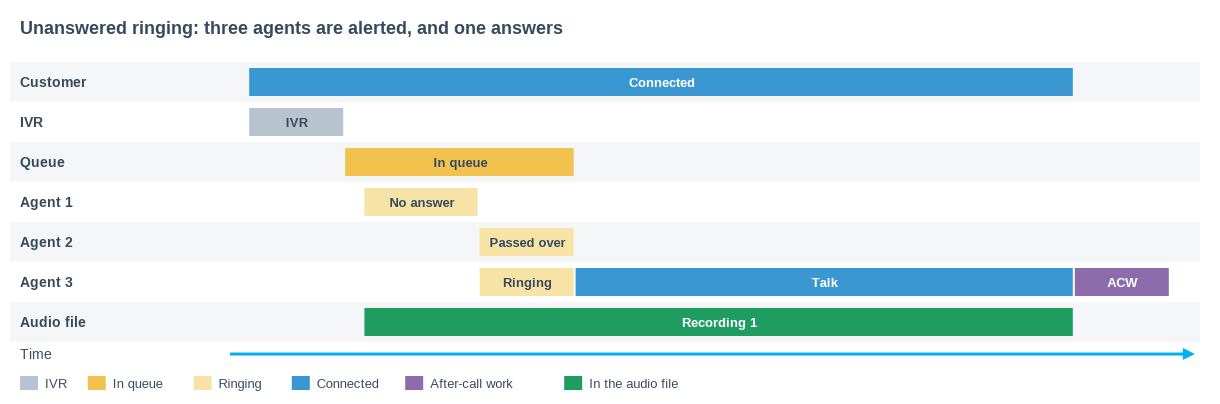
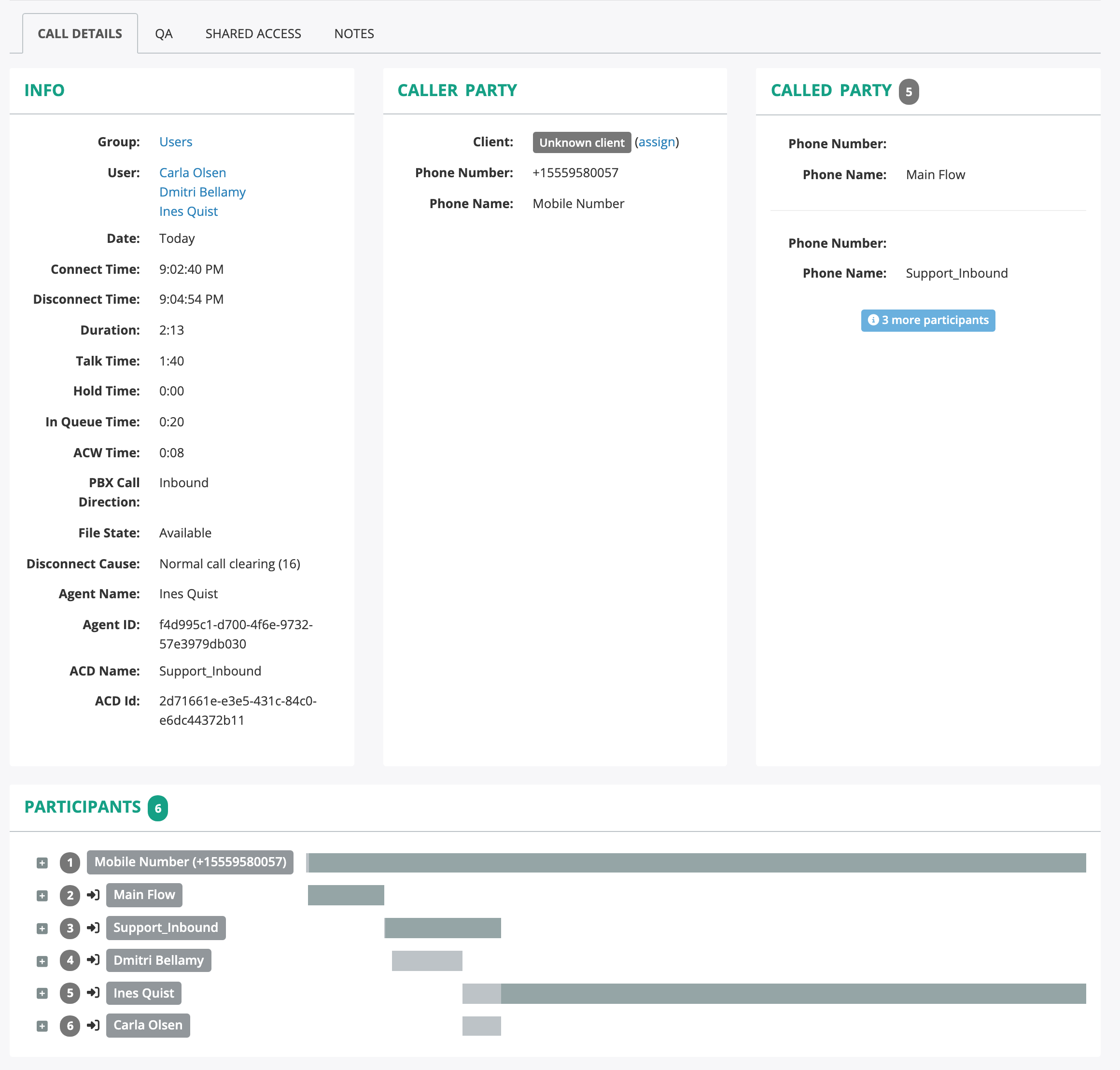
- The agents who didn't answer are participants with a light bar only.
- They are also listed as users of the call. A supervisor who filters by such an agent finds the call, although the agent didn't talk to the customer.
- To leave these agents out, ask your system operator to select Ignore participants that were alerted but didn't accept the call in the pull calls job.
Abandoned call
The customer hangs up while waiting in the queue.
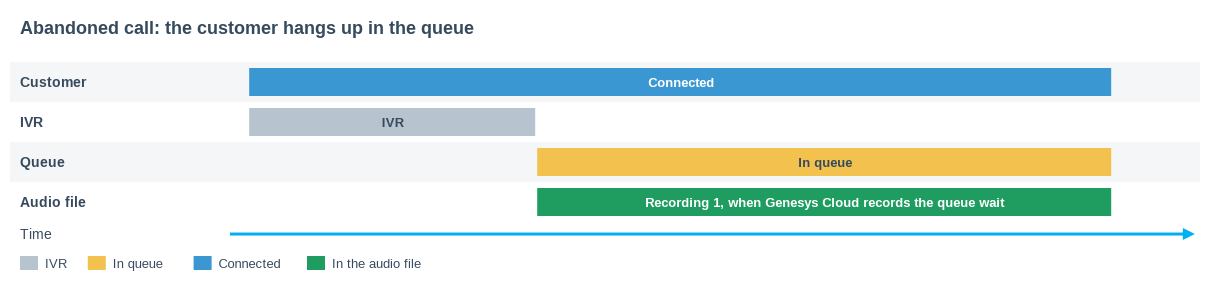
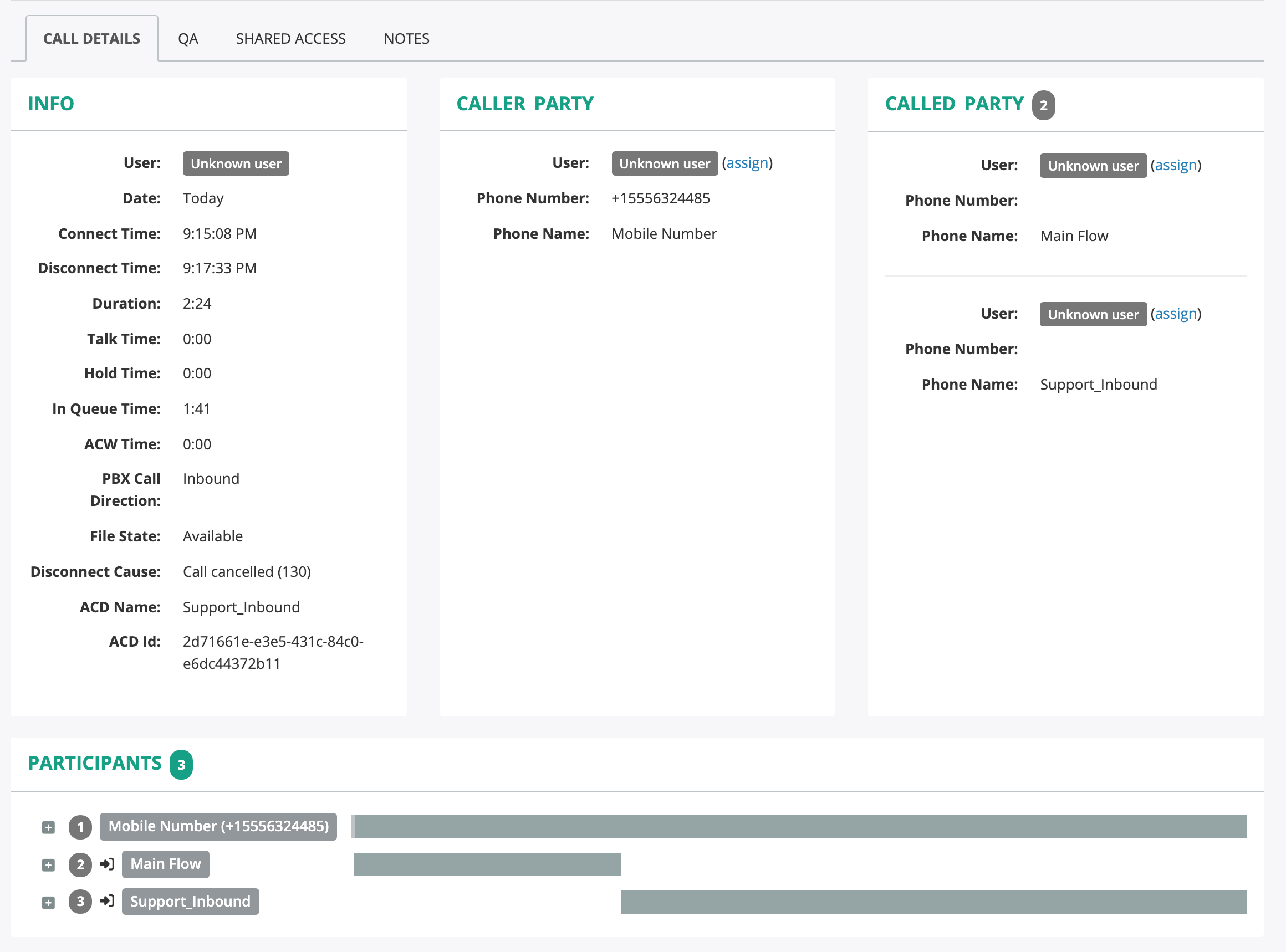
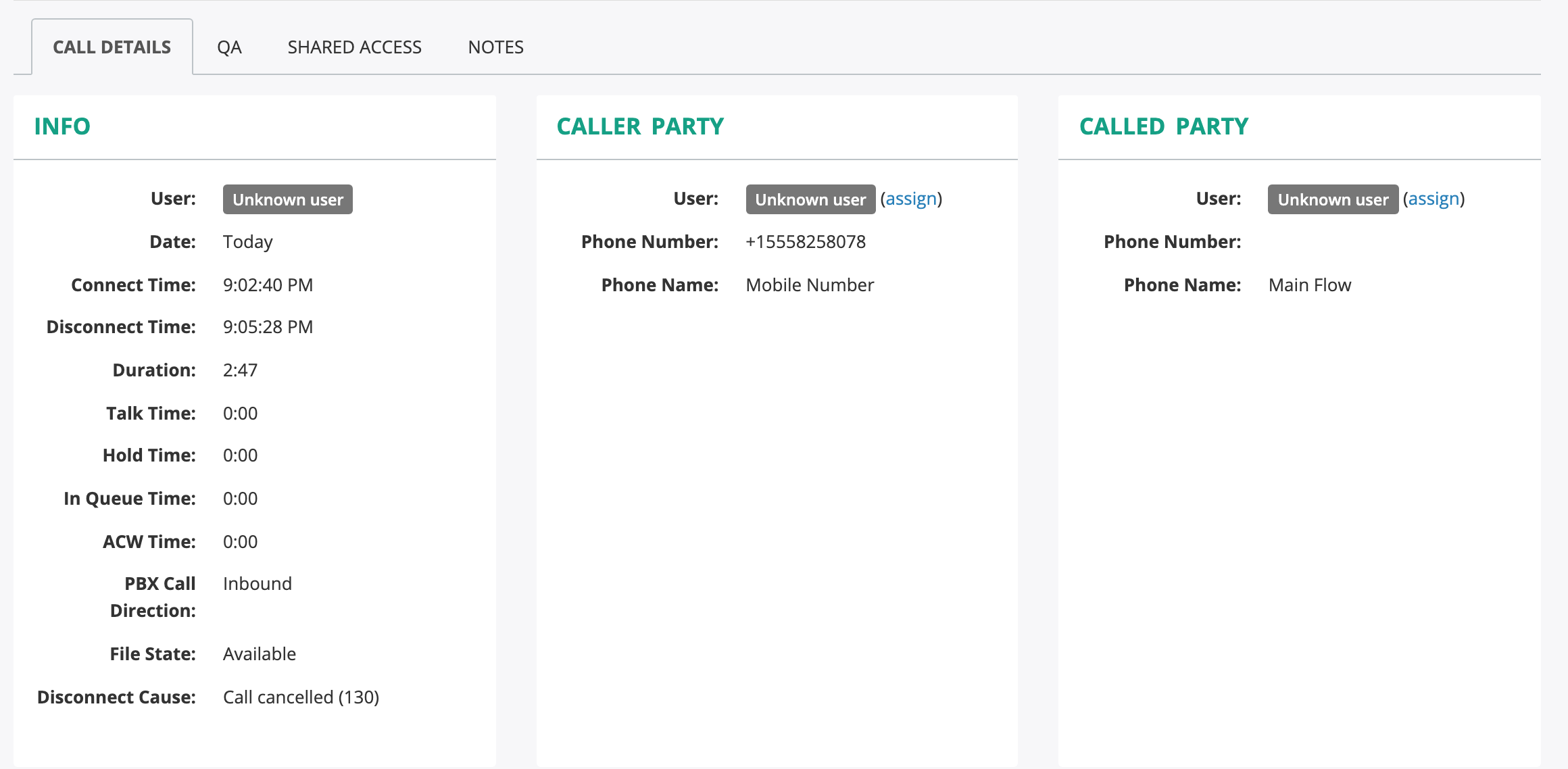
- The call has no agent, so User is Unknown user and Disconnect Cause is Call cancelled.
- To find the calls that no agent answered, go to Recordings > Advanced Search and use the filter Call - Agent Name, Is empty. The Unassigned Calls tab isn't suitable, because it also lists answered calls that went through an IVR or a queue.
- The call has audio only if Genesys Cloud recorded the queue wait. See Choose what is in the audio.
- In Queue Time shows how long the customer waited. Talk Time is zero.
IVR-only call
The customer hangs up in the IVR, or the IVR answers the request. The call looks like an abandoned call without a queue. It has audio only if Genesys Cloud recorded the IVR. See Choose what is in the audio.
Voicemail
No agent answers, and the customer leaves a voicemail.
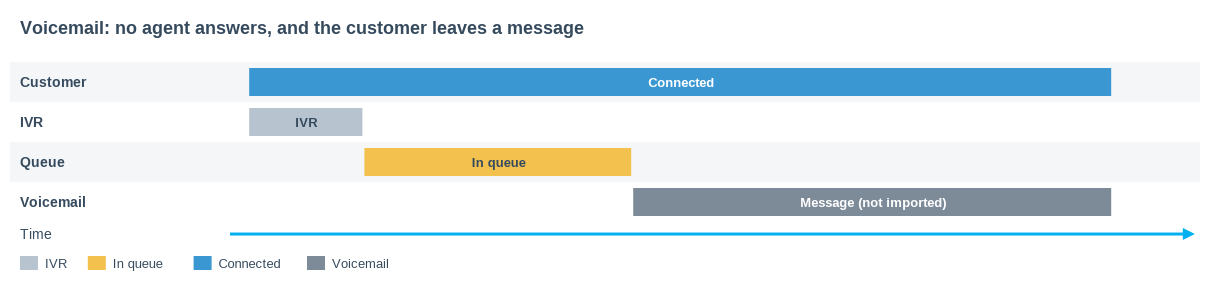
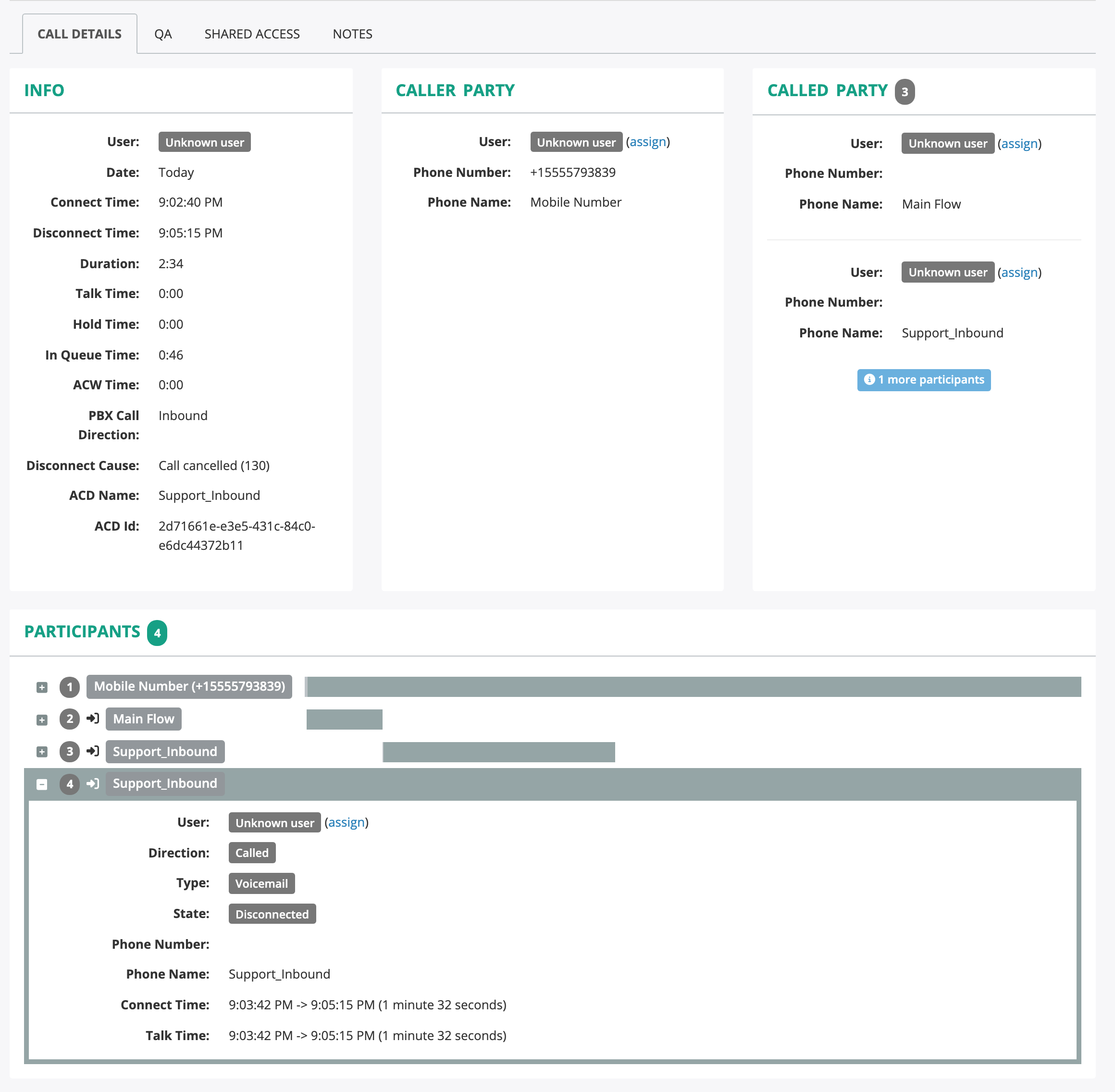
- MiaRec imports the call with the customer, the IVR, the queue, and the mailbox. The mailbox is a participant of the type Voicemail, from the time when the call went to voicemail. It can have the name of the queue, as in the screenshot. Select the plus sign next to it to see its type.
- The voicemail message isn't imported. Genesys Cloud keeps it as a voicemail message, apart from the recordings of the conversation.
A party that MiaRec has no type for, such as a survey after the call, is also a participant, of the type Other. Its
name includes the Genesys Cloud purpose, for example Post-Call Survey (voicesurveyflow).
Other cases
| Case | How MiaRec handles it |
|---|---|
| Call of a second or two | Genesys Cloud can report a recording without audio. MiaRec imports the call, and shows the recording as unavailable. |
| Call that isn't recorded | MiaRec imports the call without audio, unless the pull calls job ignores conversations that have no recordings. |
| After-call work that isn't completed in time | Genesys Cloud assigns the wrap-up code ININ-WRAP-UP-TIMEOUT. The call is completed as usual. |
| Long after-call work | The call stays in progress until the agent finishes, even though the customer hung up. |
| Agent changes the wrap-up code later | MiaRec doesn't pick up a change that is made after the call was completed. |
| Conversation that Genesys Cloud never closes | MiaRec completes the call after the maximum conversation duration (4 hours by default). |
| Supervisor who monitors a call | The supervisor is a participant, but not the agent who answered the call. |
| Conversation that is deleted in Genesys Cloud | MiaRec completes the call with the details that it has, and doesn't update it later. |
| Screen recording | Genesys Cloud screen recordings aren't imported. The call and its audio are. |
| Recording that is archived in Genesys Cloud | Not imported until you restore it. See A call has no audio. |
| Chat, email, and messaging | Not imported. MiaRec imports voice conversations and callbacks. |
| Internal call between agents | Genesys Cloud doesn't record internal calls on the trunk. Recording on the phones is needed. |