QA permissions
This page covers the administrative side of Quality Assurance access: which permissions and licenses control who can design scorecards, evaluate conversations, and see evaluation results. The QA workflow itself — scorecards, Auto QA review, manual evaluations — is documented in the User Guide QA chapter; the concepts are in the Quality Assurance concept page.
All permissions below are granted on roles under Administration › User Management › Roles — see Roles and permissions for how roles and access scopes work in general.
Note
Quality Assurance features are available if your subscription includes Auto QA.
Evaluation licenses
An agent must have an evaluation license assigned for manual and assigned evaluations — creating an evaluation for an unlicensed user fails with an error naming the missing license. (Auto QA scoring is gated by the speech-analytics license instead — see Auto QA setup.) Licenses are assigned per user on the user account (see User accounts).
Scorecard management rights
The Evaluation forms permission (in the Admin permissions section of the role editor) controls scorecard management, with the verbs View, Create, Edit, and Delete. Users whose role includes it see the Scorecards tab in the QA menu and can work in the scorecard designer.
The permission is available for roles with the Organization or Selected Groups access scope, so scorecard management can be delegated to supervisors and QA leads without making them administrators.
Who sees which evaluations
Evaluation visibility is controlled by three permissions in the Other permissions section:
| Permission | Controls |
|---|---|
| Evaluation reports - Own evaluations of agents | Evaluations the user performed on agents in their scope: view, create, edit, delete. |
| Evaluation reports - Other managers' evaluations | Evaluations performed by other evaluators — including auto-scored evaluations, which have no evaluator: view, edit, delete. |
| Evaluation reports - Evaluations of self | The user's own results as an evaluated agent — view only. |
The role's access scope limits all of these to the matching data: a supervisor role with the Selected Groups scope sees only evaluations of agents in the groups it manages.
The QA › Evaluations list — with its Pending, In progress, and Completed queues — shows each user exactly the evaluations these permissions allow (see Reviewing and overriding evaluations). An agent role with only Evaluations of self gets a view-only list of their own results, which is how evaluation feedback reaches agents directly.
Evaluating conversations
The right to evaluate is part of the conversation permissions: the Conversations - Other users' permission includes the Evaluate and Assign evaluation verbs. A user needs them to manually evaluate a conversation or assign an evaluation to another evaluator.
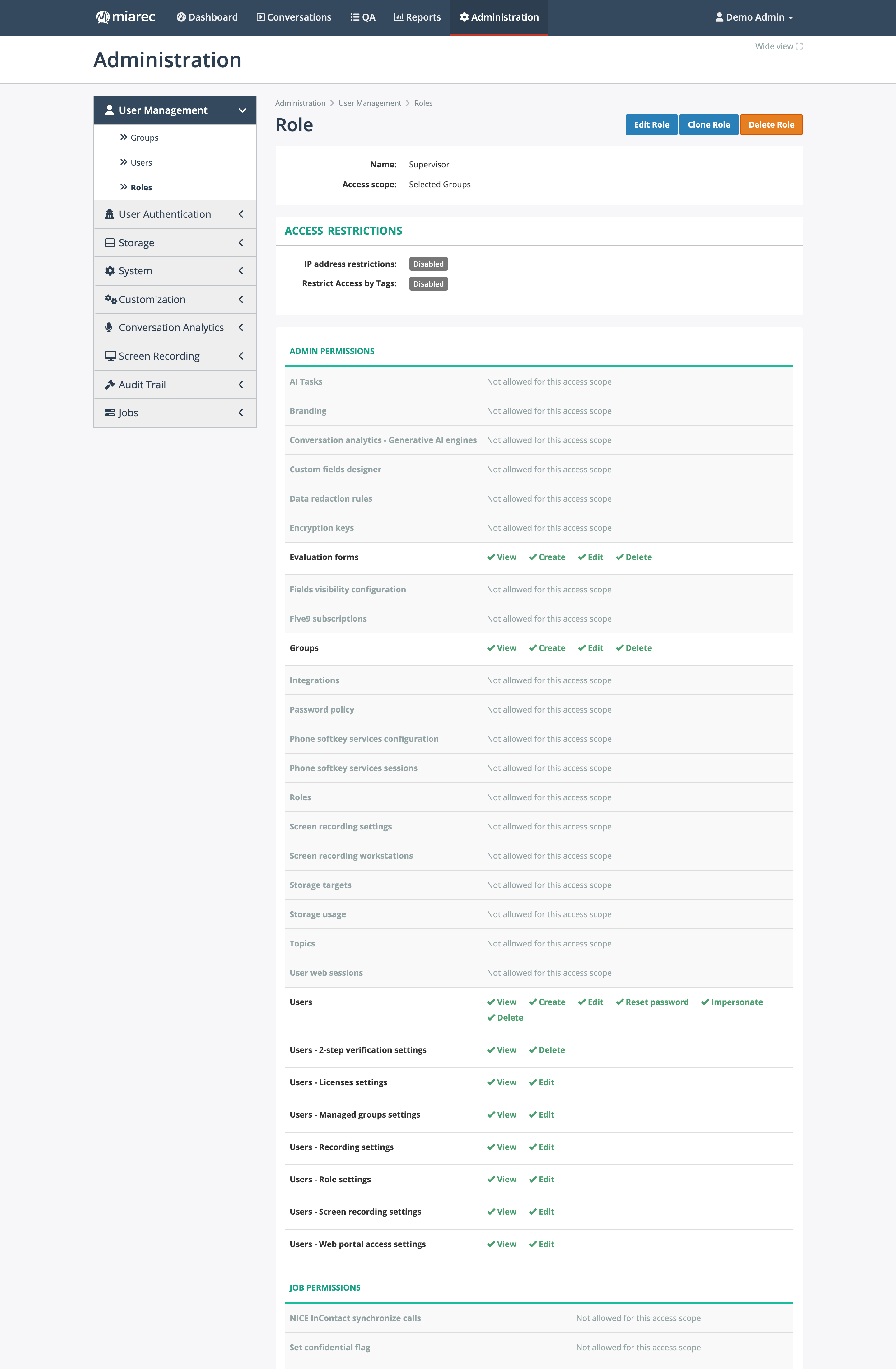
The top of a supervisor role, showing Evaluation forms granted in full under Admin permissions. Further down the same page are the three Evaluation reports rows under Other permissions and the Evaluate / Assign evaluation verbs under Conversations - Other users'. Notice the access scope — Selected Groups — which limits all of it to the groups this role manages.
Typical setups
- Supervisor / QA lead — Selected Groups scope; Evaluation forms (all verbs); Evaluation reports - Own evaluations of agents and Other managers' evaluations; Conversations - Other users' with Evaluate and Assign evaluation.
- Agent — User scope; Evaluation reports - Evaluations of self (View) only.
Related pages
- Enabling Auto QA — the admin-side Auto QA task configuration.
- Roles and permissions
- People & Access in the Overview.