Overview
This guide explains how to integrate the NetSapiens (SNAPsolution) platform with the MiaRec Analytics Platform.
Prerequisites
- NetSapiens SNAPsolution v45 or higher.
- NetSapiens system administrator access on every core that handles the customer's calls to configure the following:
- Enable SIPREC
- Configure connections to the MiaRec service
- Configure the SIPREC LEA
- Legal Intercept (LIC) entries for each customer
- Admin credentials for the MiaRec web portal (
https://app.miarec.com). Contact your MiaRec account manager to get access.
How it works
The NetSapiens core sends a copy of each recorded call to MiaRec over SIPREC, the standard SIP Recording protocol. MiaRec stores the recording, associates it with the right customer and user, and analyzes it with AI.
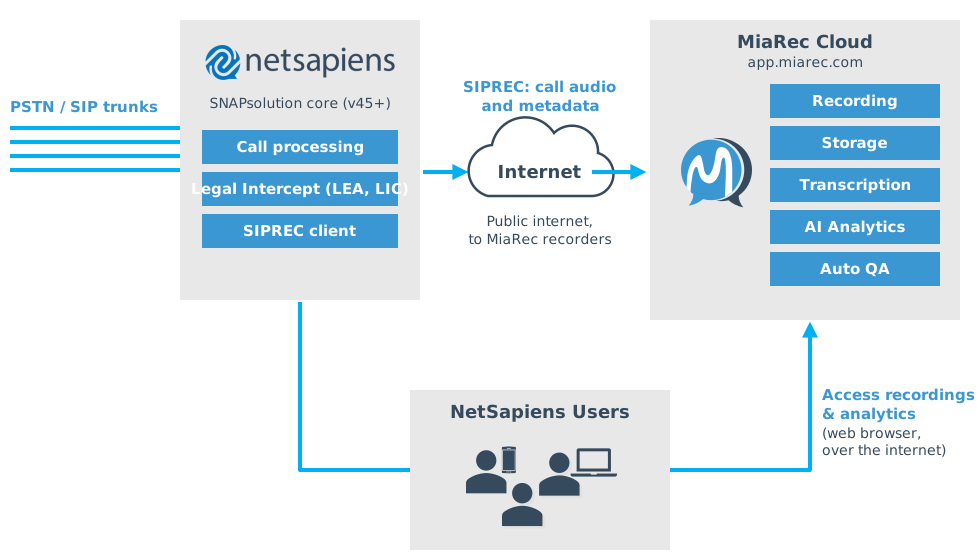
Users place and receive calls through the NetSapiens core as usual. When a call is answered, the core checks its Legal Intercept configuration. If one of the participants matches an LIC entry, the core selects the configured LEA and opens a SIPREC session to an available MiaRec recorder.
It sends a SIP INVITE with an additional XML payload containing call metadata (participants, service provider and reseller IDs, domain, etc.) and a forked copy of the call audio over RTP.
MiaRec matches the call to a tenant and a user with the following metadata provided in the SIPREC INVITE:
- Service provider ID
- Reseller ID
- Domain
- Extension
The recording appears in the MiaRec web portal while the call is in progress. Once the recording is complete, the audio is used to generate the following (including but not limited to):
- Transcription
- Sentiment analysis
- Topic and keyword analysis
- Call summary
- Manual and automated QA using the AI assistant
- AI insights, like "Next Actions" and "Key Facts"
Recordings are accessed with a web browser through the MiaRec service, and access is controlled with role-based access control.
Supported call scenarios
MiaRec and NetSapiens were tested together on multiple call scenarios across the domain, user, device, call queue, and auto attendant scopes. These include:
- On-net calls between users, and inbound and outbound PSTN calls
- Desk phones and the NetSapiens webphone
- Hold and resume, blind and attended transfer, call park and retrieve
- Conferences, call pickup, and supervisor listen, whisper, and barge
- Call queues (round-robin and ring-all, including off-net agents and queue callback)
- Auto attendants, forwarding, and simultaneous ring
Frequently asked questions
-
Do I need to install anything on the customer's network or computers?
No. NetSapiens sends recordings directly to the MiaRec cloud.
-
How long does it take for a recording to appear in MiaRec?
Active calls appear in the portal as soon as they are answered. The recording is complete shortly after the call ends, usually within a minute.
-
Does SIPREC use extra NetSapiens sessions?
Yes. A recorded call uses one additional session for the SIPREC stream. See the NetSapiens article "NetSapiens Session Usage Calculation, Overage Utilization, and Pricing Policy".
-
What happens to local NetSapiens call recording?
It keeps working. If local recording is also enabled for a device, user, or domain, both recordings are made. Disable local recording (including Domain-Wide Call Recording) where you don't need it.
-
How long are recordings kept?
The retention period depends on the MiaRec package. Check MiaRec Pricing for details.