Tenant configuration
This page is a reference for the tenant detail page — the hub where an operator provisions everything about one tenant. Open it from Administration › User Management › Tenants (or › System for the System tenant itself).
The page is tabbed: Tenant Info (everything described below), plus Users, Groups, Roles, Extensions, Branding, Password Policy, and Other — per-tenant views of the same objects the tenant's own administrators manage. The toolbar offers Edit Tenant, Clone Tenant, and Delete Tenant.
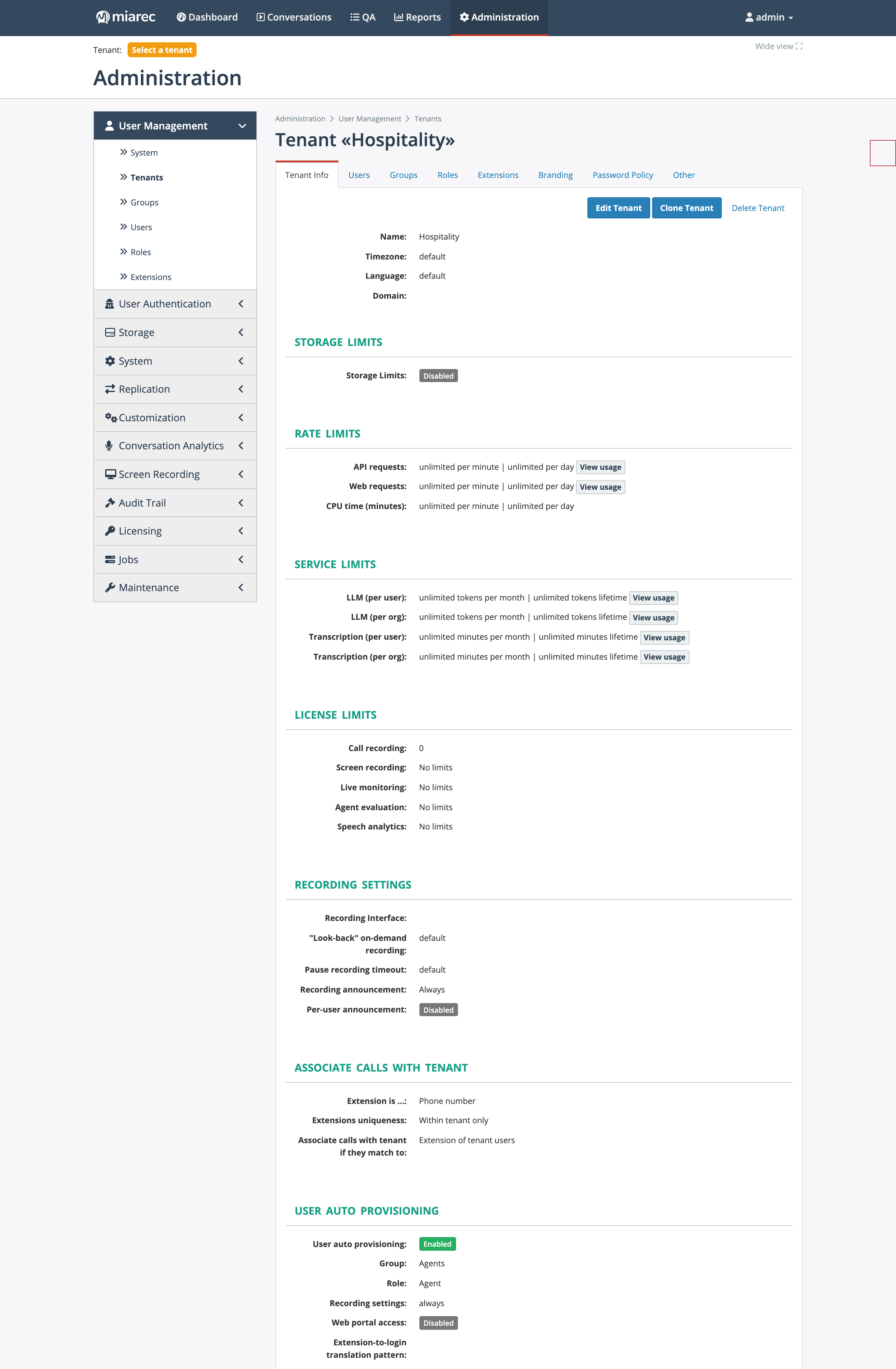
The Tenant Info tab packs all per-tenant provisioning into one page: storage, rate, and service limits, license limits, recording settings, association rules, and auto-provisioning (shown above), followed by screen recording and audio settings and an inline audit trail further down.
Storage limits
Whether the tenant's audio and screen-recording storage is capped. The limits themselves and the enforcement job are documented in Storage limits; this section shows the tenant's current state (for example Disabled — no cap).
Rate limits
Request quotas protecting the platform from a single tenant's traffic:
- API requests and Web requests — per minute and per day.
- CPU time (minutes) — per minute and per day.
The API and Web rows have a View usage link to the tenant's request statistics — the same data as API usage. Unset values mean unlimited.
Service limits
Metered AI consumption caps, each settable per user and per organization, per month and lifetime:
- LLM — generative AI tokens consumed by AI tasks.
- Transcription — speech-to-text minutes.
View usage links open the corresponding usage dashboards. See transcription tenant configuration for how these limits interact with pooled limits and user licensing.
License limits
Per-tenant seat caps for the five license types: Call recording, Screen recording, Live monitoring, Agent evaluation, and Speech analytics. A type with no value shows No limits — the tenant is in dynamic mode and draws from the system-wide pool. This is one of the three places licensing lives (keys, limits, assignment) — see License usage.
Recording settings
Capture behavior for conversations recorded by the MiaRec recorder:
- Recording Interface — which phone-system integration records this tenant's calls (see Recording interfaces).
- "Look-back" on-demand recording — whether on-demand recordings include audio from before the trigger.
- Pause recording timeout — automatic resume after a pause.
- Recording announcement and Per-user announcement — announcement behavior, when the announcement feature is enabled on the system (see Announcement rules).
Values shown as default fall back to the system-wide setting.
Associate calls with tenant
The rules that route captured conversations into this tenant and to its users:
- Extension is … — what an extension means for this tenant: Phone number, Last digits, Phone name, Phone ID, Phone number or name, Broadworks user ID, Metaswitch extension, Agent ID, or Legacy (Phone number, name or BW user ID).
- Extension uniqueness — System wide or Within tenant only (allow the same extension to exist in different tenants).
- Associate calls with tenant if they match to — the tenant-matching rule: Extension of tenant users, Broadworks Service Provider + Group, MetaSwitch System + Group, Cisco Partition, SIP URI host part, or an Advanced condition expression.
- Record unknown users — whether conversations matching the tenant but not any user are recorded (Record) or dropped (Do not record). Recording unknown users is a prerequisite for auto-provisioning.
User auto provisioning
When enabled, MiaRec creates a user account automatically the first time a conversation arrives for an unknown extension that matches the tenant. Configure what each auto-created account gets:
- Group and Role;
- Recording setting — Always or On-demand;
- Web portal access — whether the account can sign in, with an Extension-to-login translation pattern and rule (a regular expression deriving the login from the extension) and the Authentication type for the new account;
- Provisioned licenses — which license seats each auto-created user receives (call recording, screen recording, live monitoring, agent evaluation, speech analytics).
Auto provisioning is allowed only when the association rules and Record unknown users are configured accordingly (the form enforces this).
Screen recording
Enables screen capture for the tenant and manages the screen-recording token used by client workstations. See Screen recording operations.
Audio settings
Per-tenant overrides of the audio storage format: File format, Audio format, AGC filter, and PLC filter — default means the system-wide values from Audio format apply.
Per-tenant transcription settings
The Tenants list includes a Transcription Prompt column showing each tenant's custom transcription prompt (vocabulary hints passed to the speech engine). These settings are edited from the tenant's transcription settings — see Transcription tenant configuration.
Audit trail
The bottom of the tenant page embeds the audit trail filtered to this tenant — handy when checking who changed a limit or setting. The full cross-tenant view is at Audit trail.
Related pages
- Onboarding a tenant — the order to configure these sections for a new customer.
- Extensions — managing the extension pool the association rules match against.
- Licensing overview — what each license type gates.